Connect to e-commerce and social media data for product research, customer feedback analysis, and AI-powered insights. Start with the product overview, follow the screenshots to get connected, then copy a prompt at the end of this guide to try it out.
1. Product Overview
VOC OpenAPI provides data APIs. VOC.AI MCP lets supported AI assistants call these data tools. The scope of your analysis depends on which APIs are available and what data they return.
1.1 Choose a capability based on your business goal
Product selection and competitor research → Amazon Market Insights: product filtering, competitor research, keywords, ASIN details, and trends.
Customer feedback and product improvement → Amazon Review Tasks: collect reviews, then use an analysis tool or AI to summarize positive and negative feedback, use cases, and customer needs.
Store and product research → TikTok Shop: product details, product reviews, and a seller's product list.
Brand and content research → Social Media APIs: retrieve account, content, and comment data by platform.
1.2 Choose how to connect
API for development teams: Integrate structured data into business systems, reports, or custom workflows.
MCP for AI workflows: Use natural language in a supported client to call data tools and analyze results.
1.3 Recommended steps for first-time users
① Create an API key → ② Set up the API or MCP → ③ Validate with a small sample → ④ Check the results and available credits.
For Amazon, start with prompt A01. For social media brand research, start with S01. Once you confirm data coverage, expand the number of ASINs, accounts, or platforms, or use a longer date range.
2. Illustrated Walkthrough
Follow the numbers in the red boxes. Each section gives you the menu path, the steps, and tips. Use the document outline to jump to any section.
Console: https://apps.voc.ai/openapi#/docs
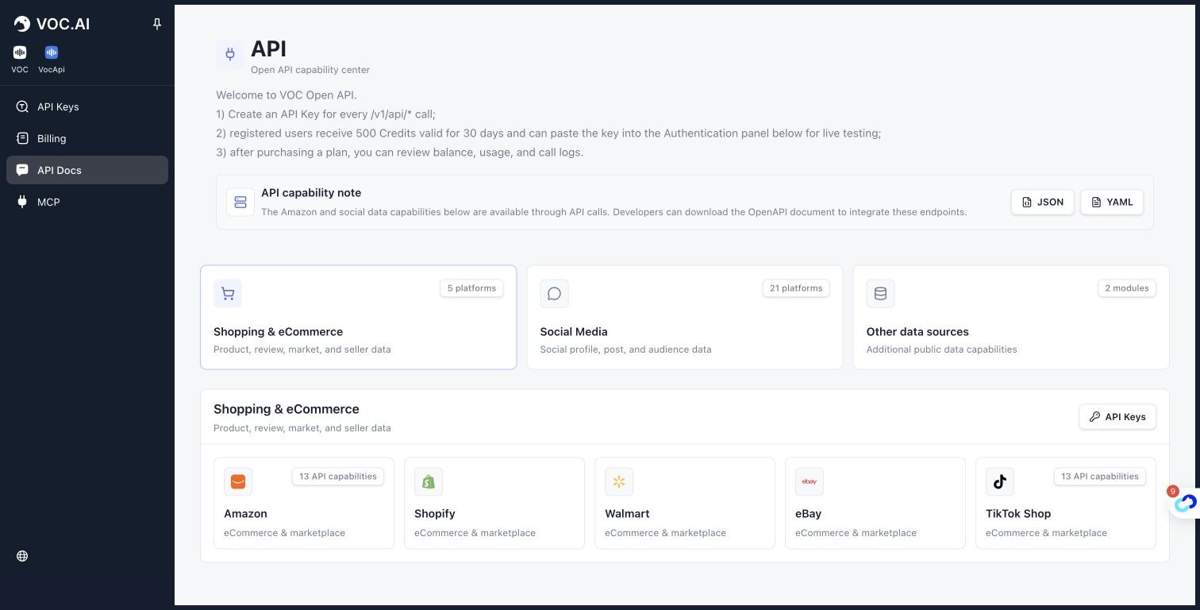
2.1 Find the product in the console
VOC OpenAPI brings e-commerce and social media data tools together in one console. Start by choosing a platform, then review the available APIs and their costs.
Menu path: VocApi → API Docs → Shopping & eCommerce → Amazon
Steps: Follow 1 → 2 → 3 in the screenshot: click API Docs, Shopping & eCommerce, and then Amazon. The Amazon capability categories expand below.
Tip: The numbers in the red boxes show the order of clicks.
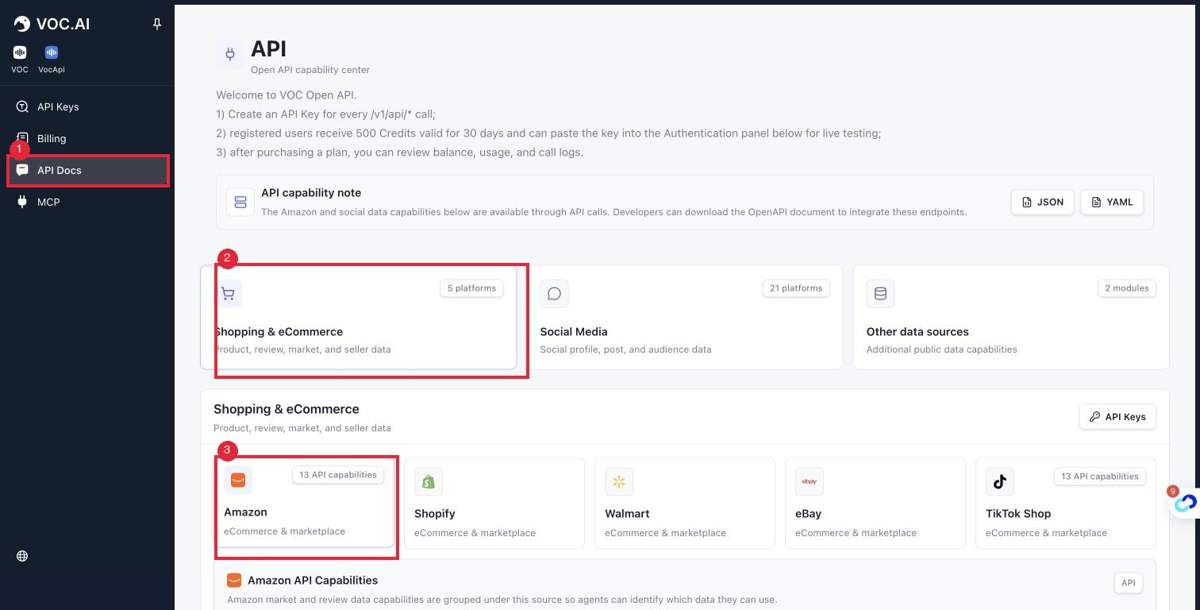
2.2 Create and manage API keys
An API key is the credential you need to access the APIs. Create and manage your keys here before connecting.
Menu path: VocApi → API Keys → Scroll down → Create New Key
Steps: Click API Keys in the left sidebar, scroll down to the list of keys, and click Create New Key on the right.
Tip: Create a key before configuring the API or your AI client.
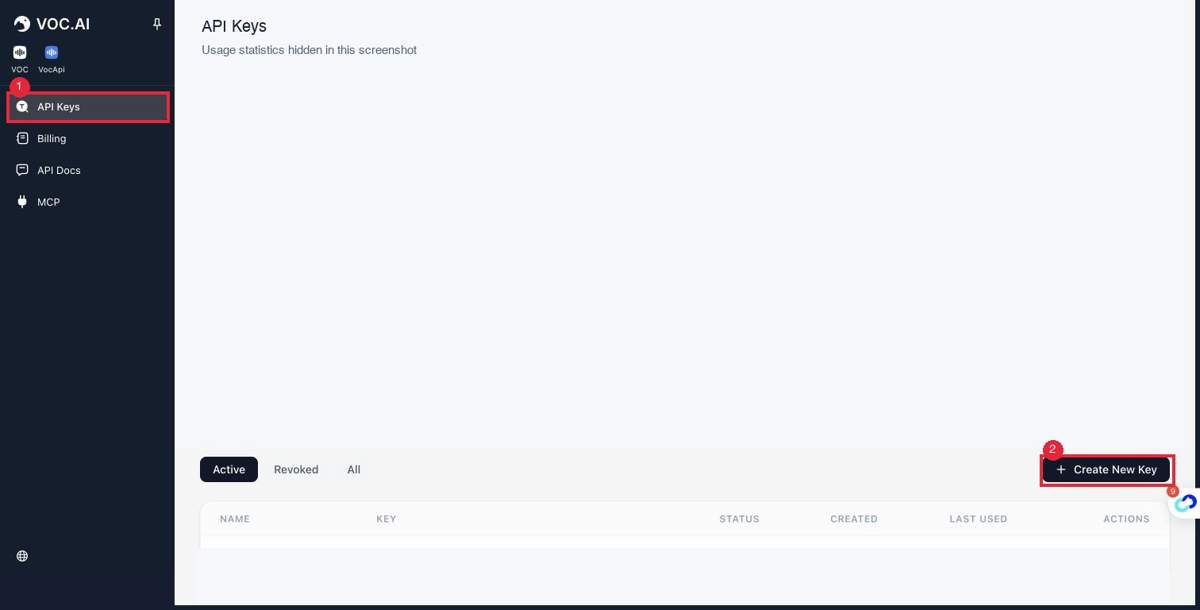
2.3 Enter a key name
Give the key a recognizable name, such as “Business System Integration,” to make it easier to manage later.
Menu path: API Keys → Create New Key → Enter a Key Name → Create
Steps: Enter a name in the Key Name field and click Create. Follow the instructions to save the key, then have a developer configure it on the server.
Tip: Store the key securely. Keep it out of public code and front-end pages.
2.4 Find the two types of Amazon data
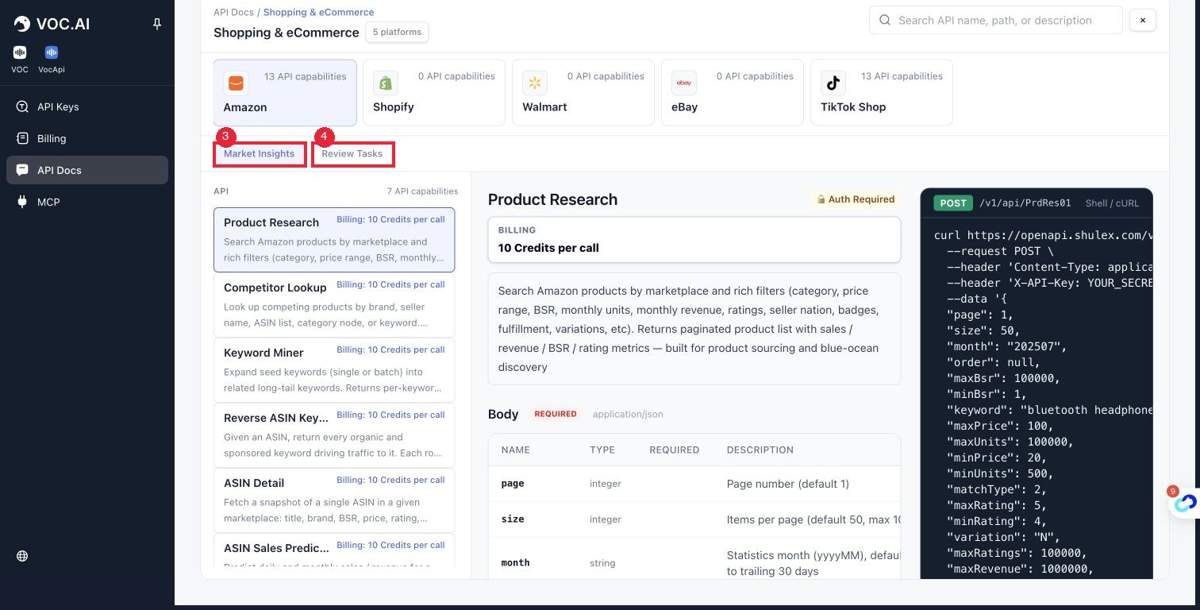
Amazon has two categories: Market Insights and Review Tasks. Choose Market Insights for product selection, competitor research, or keyword research. Choose Review Tasks to collect product reviews.
Menu path: API Docs → Shopping & eCommerce → Amazon → Market Insights or Review Tasks
Steps: Click Amazon, then choose Market Insights (red box 3) or Review Tasks (red box 4), depending on your goal.
Tip: Market Insights and Review Tasks are separate options under Amazon.
2.5 Research products and competitors
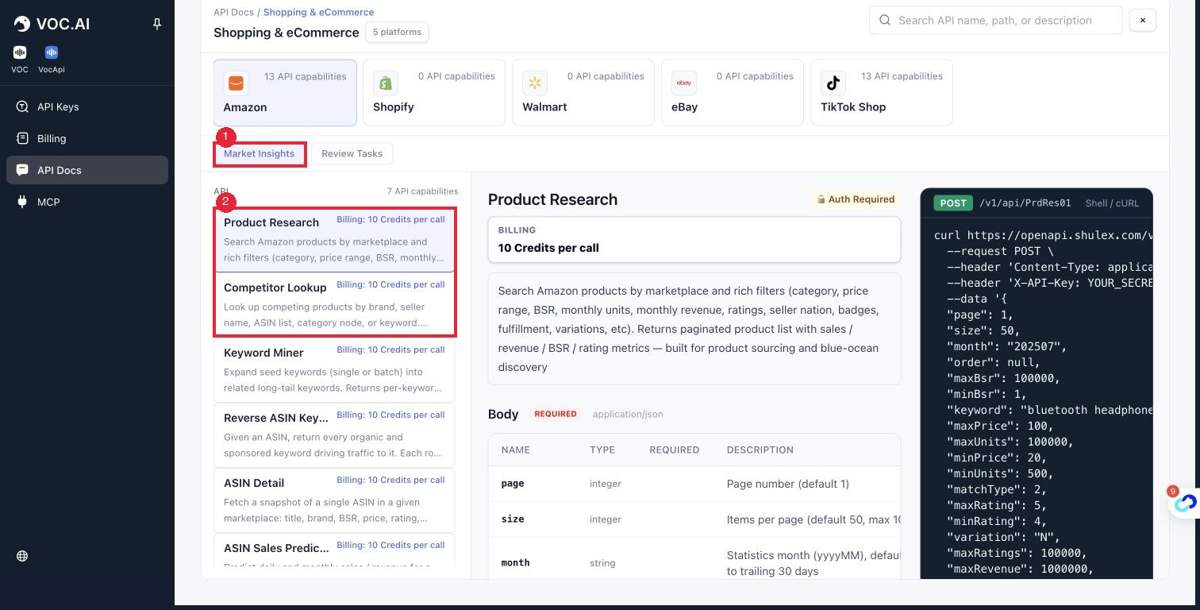
Use Market Insights to filter products, compare competitors, research keywords, and look up ASIN details, sales forecasts, and historical trends.
Menu path: API Docs → Shopping & eCommerce → Amazon → Market Insights → Choose an endpoint
Steps: Select Market Insights, then choose the product finder, competitor lookup, or another endpoint from the left-hand list. The panel on the right shows the description, cost, parameters, and request examples.
Tip: The product finder, for example, shows the marketplace and filters across several dimensions. Use forecasts as a research aid and evaluate them alongside actual business performance.
2.6 Retrieve Amazon product reviews
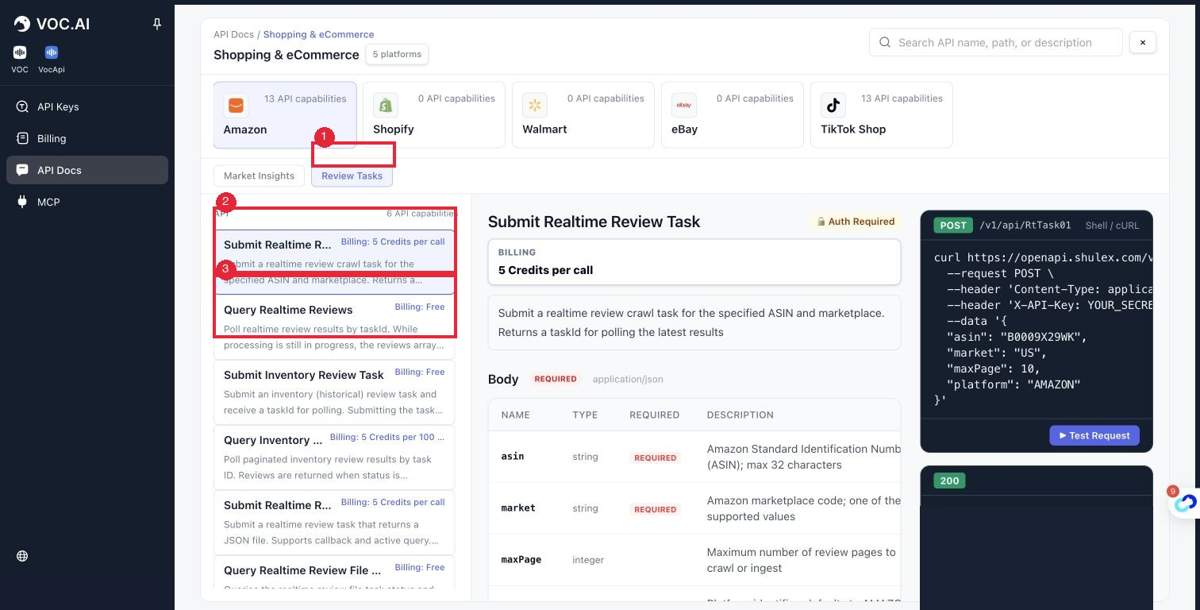
Review collection runs as an asynchronous task. A successful submission returns a taskId that you use to retrieve the reviews.
Menu path: API Docs → Shopping & eCommerce → Amazon → Review Tasks → Submit a task → Query the results
Steps: ① Select Review Tasks. ② Submit a real-time or historical review task as needed. ③ Save the returned taskId. ④ Use the matching query endpoint to check the task status and retrieve all pages of results.
Tip: Use the real-time query endpoint for real-time tasks and the historical (inventory) query endpoint for historical tasks. The reviews field may be empty while a task runs. Wait until status = SUCCESS before reading the results. If the task fails, check the error reason in the response. Red boxes 2 → 3 show the real-time workflow.
2.7 Look up TikTok Shop products and reviews
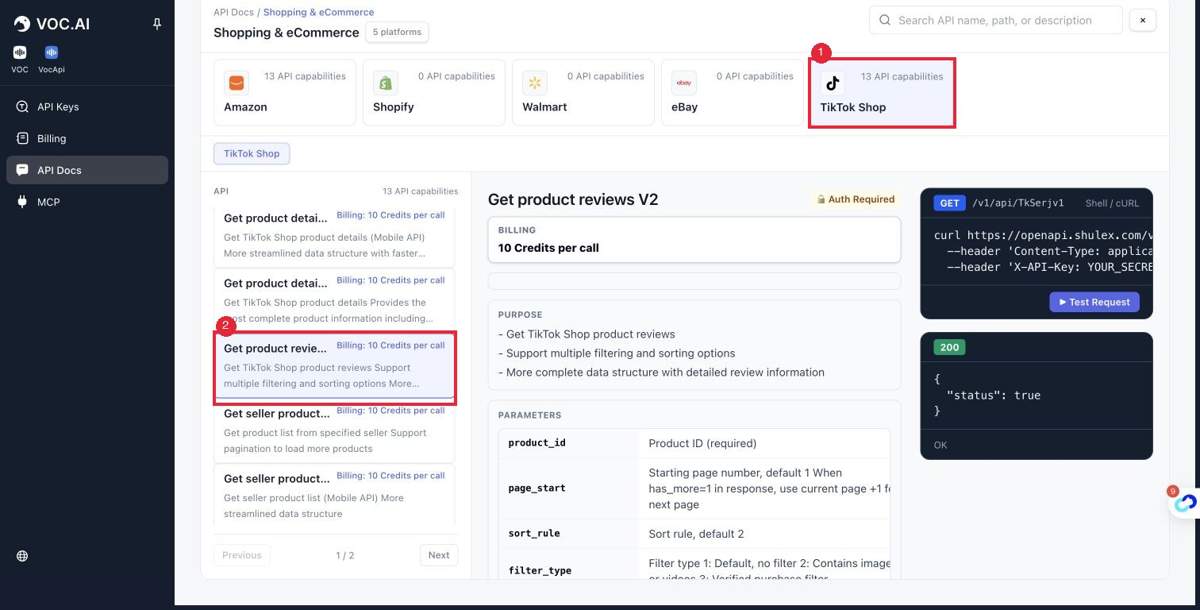
TikTok Shop endpoints provide product details, product reviews, seller product lists, and other data for product selection and store research.
Menu path: API Docs → Shopping & eCommerce → TikTok Shop → Choose an endpoint
Steps: Select TikTok Shop at the top, then choose an endpoint from the list on the left. For product information, use the product details endpoint. For customer feedback, use Get Product Reviews V2.
Tip: Fields and usage requirements may differ between versions. If an endpoint is marked deprecated, use the replacement recommended in the documentation.
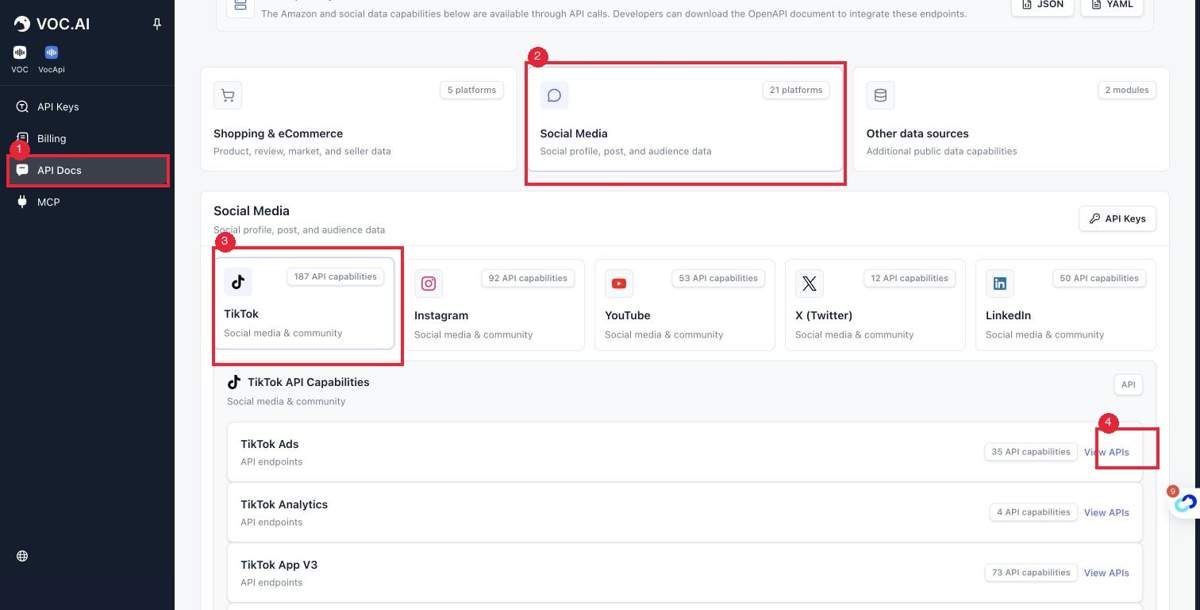
2.8 Find social media data endpoints
VOC OpenAPI provides account, content, comment, and audience data across multiple platforms. Available data varies by platform, so check the specific endpoints first.
Menu path: API Docs → Social Media → Target platform → View API → Choose an endpoint
Steps: Click API Docs on the left, select Social Media, then choose TikTok, Instagram, YouTube, or your target platform. Expand the platform, click View API, and choose the feature you need from the endpoint list.
Tip: If you don't see your platform on the first screen, scroll down. TikTok Shop is under Shopping & eCommerce; TikTok social content is under Social Media.
Endpoint catalog: See the Excel attachment below for the currently supported endpoints.
Open the API and MCP endpoint catalog (Excel) in DingTalk Docs.
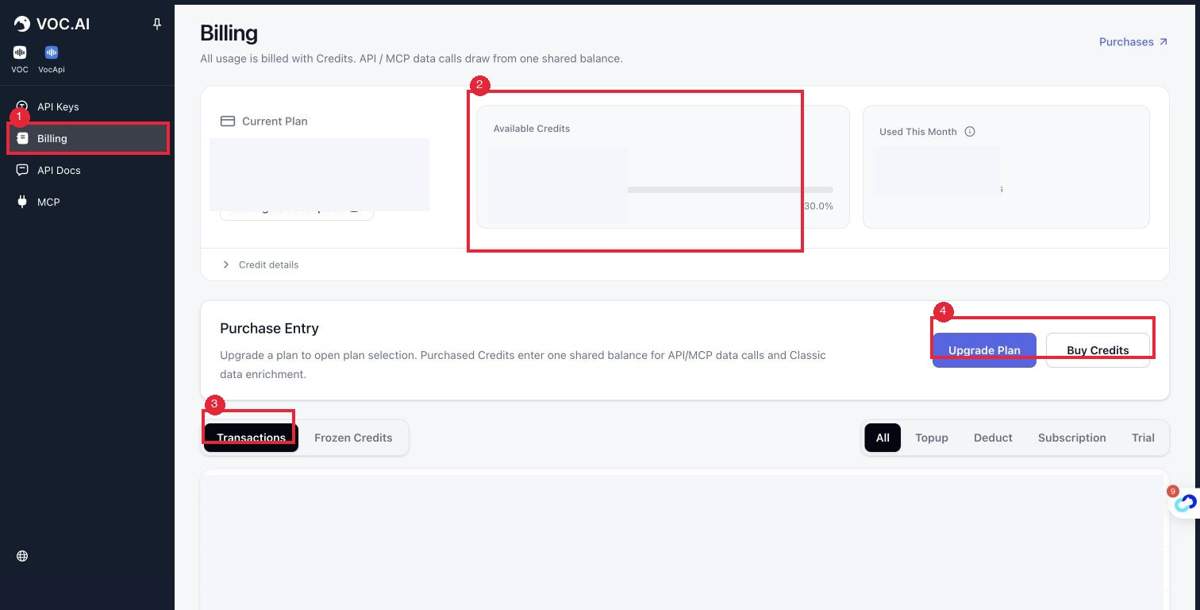
2.9 Check credits and transaction history
The Billing page shows your current plan, credit balance, and usage history. API and MCP calls draw from the same credit pool, subject to the rules shown in the console.
Menu path: VocApi → Billing → Credit Balance / Transaction History / Purchase Options
Steps: Click Billing in the left sidebar. Scroll down to the credit card and Transaction History. To see purchase options, look for Upgrade Plan or Buy Credits.
Tip: Check the console for current prices, credit allowances, and billing rules.
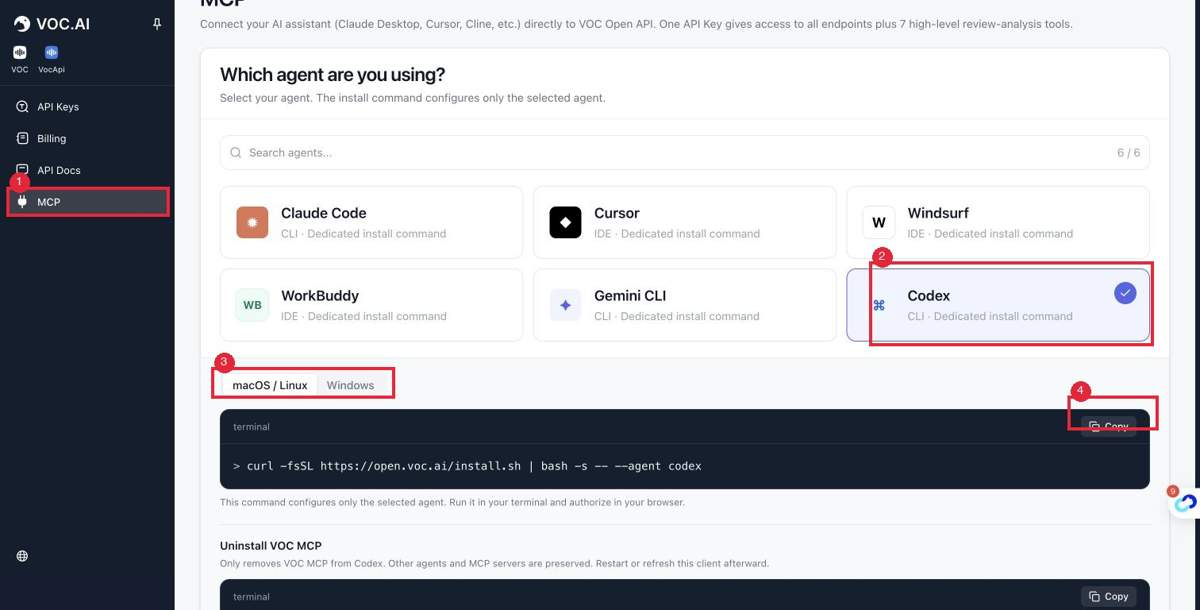
2.10 Connect the data tools to an AI assistant
To use the data tools in a supported AI client, open the MCP page for setup instructions and the available tools.
Menu path: VocApi → MCP → Select a client → Select an operating system → Follow the setup instructions
Steps: Click MCP in the left sidebar. Select the client you use, choose macOS / Linux or Windows, and follow the instructions to finish setup. Use your own API key.
Tip: Select the client and operating system that match your environment. Tool calls may consume credits. Review the tool description and cost before using it.
Detailed setup steps: See the PDF attachment below.
Open the detailed MCP setup guide (PDF) in DingTalk Docs.
3. Integration and Data Checks
Validate the data before scaling up: Check the marketplace, fields, sample size, how up to date the data is, and the cost. Use forecast data as a research aid.
API calls: Endpoints under /v1/api/* require an API key. Download the OpenAPI specification in JSON or YAML from the documentation home page. Check the parameters and billing before sending a Test Request.
Trial and billing: The console documentation says that signing up provides 500 credits, valid for 30 days. Credits do not correspond to a fixed number of calls. API and MCP usage draws from the same credit pool. Check the latest policy in the console.
4. How to Use MCP Prompts
Choose a use case → Copy the matching prompt → Replace the values in { } → Send the prompt to an AI assistant connected to VOC.AI MCP.
Amazon quick picks: A01 to confirm the product, then A02 for review insights. Use A03 for negative reviews, A04 for competitor comparisons, A05 to optimize a listing, A06 for a full report, and A07 for product selection.
Social media quick picks: S01 for a brand overview, S02 to compare UGC and BGC, S03 for content and comments, S04 to assess creators, S05 for cross-platform trends, and S06 for a full report.
4.1 Fill in these details before you start
Amazon: Marketplace, ASIN, date range, and whether to cover the current ASIN or all variants. Supported marketplace codes include US, CA, MX, GB, DE, FR, IT, ES, JP, and AU. Use GB for the United Kingdom.
Social media: Platform, brand or keyword, account or link, date range, language or region, and desired sample size. UGC refers to content from creators or users; BGC refers to content from official brand accounts.
4.2 Rules that apply to all prompts
Analyze only the data you actually retrieve. State when an endpoint is unsupported, a task fails, or a sample is too small. Distinguish facts, interpretations, and recommendations. Do not invent numbers, product benefits, or customer profiles.
Reviews across all variants: Identify the parent and child ASINs first. Retrieve every page of results from successful tasks for each child ASIN. Deduplicate within each task, then deduplicate globally across variants by reviewId. Do not add together the total values from separate tasks.
The following templates describe analysis goals and do not guarantee data coverage. Use the tool names and fields in your client's current tool documentation. Check your credit allowance before running large requests.
5. Common Amazon Prompts
5.1 A01 — Product Details and Data Coverage
To copy a prompt, select the full text in the block below and copy it. Replace the placeholders before use.
Please use VOC.AI MCP to look up ASIN {ASIN} on Amazon {marketplace}.
Use the ASIN product details tool to retrieve the parent ASIN and variationList. If the input is a child ASIN and the variant list is incomplete, look up the parent ASIN and deduplicate by variationList[].asin.
Provide:
1. Product title, brand, price, rating, rating count, written review count, and category.
2. Input ASIN, parent ASIN, all identifiable child ASINs, and variant attributes.
3. Available data types and missing fields.
4. The three questions most worth investigating next.
State the marketplace and retrieval time. Do not treat the rating count as the written review count.
5.2 A02 — Quick Review Insights Across All Variants
To copy a prompt, select the full text in the block below and copy it. Replace the placeholders before use.
Please use VOC.AI MCP to analyze written reviews across all variants of ASIN {ASIN} on Amazon {marketplace} for {date range, default: past 12 months}.
Follow these rules:
1. Use AsnDet01 to identify the parent ASIN and the full list of child ASINs. Do not automatically treat the parent ASIN as a purchasable variant.
2. For historical reviews, use InvTsk01 to create a task for each child ASIN, then query it with InvQry01. For real-time reviews, use RtTask01 and RtQry01 instead.
3. Read results only after a task succeeds. Retrieve every page, starting at pageNo=1.
4. After retrieval, filter by reviewDate and deduplicate globally across variants by reviewId.
5. Retain the child ASIN, variant, date, and original text for each review.
Report data scope, variant coverage, the top five reasons for positive reviews, the top five complaints, use cases, unmet needs, and three recommended actions. State explicitly if the sample is too small or a task fails.
5.3 A03 — Root Causes of Negative Reviews
To copy a prompt, select the full text in the block below and copy it. Replace the placeholders before use.
Please use VOC.AI MCP to analyze one- to three-star written reviews for ASIN {ASIN} on Amazon {marketplace} over {date range}. Scope: {current ASIN / all variants}.
If analyzing all variants, identify the parent and child ASINs first, then retrieve every page for each child ASIN and deduplicate globally by reviewId.
Provide:
1. The five most common complaints, including mention counts, their share of the valid sample, and trends over time.
2. Specific root causes for each issue, affected variants, and representative quotes.
3. A breakdown of product quality issues, listing inaccuracies, logistics problems, barriers to use, and expectation gaps.
4. Improvements prioritized by impact and feasibility.
Do not use star ratings alone to infer the cause of a complaint.
5.4 A04 — Compare Your Product With Competitors
To copy a prompt, select the full text in the block below and copy it. Replace the placeholders before use.
Please use VOC.AI MCP to compare our product {our ASIN} with {competitor ASINs} on Amazon {marketplace} for {date range}.
Compare product information, prices, ratings, review themes, positive feedback, complaints, use cases, and unmet needs on the same basis. Retrieve reviews for each ASIN separately, fetch all pages, and deduplicate.
Provide:
1. Sample scope and how the data was collected and compared.
2. Our product's relative strengths and weaknesses.
3. Needs competitors meet that our product does not.
4. Opportunities to differentiate the product, listing, and marketing.
5. Direct customer quotes that support the conclusions.
Do not generalize findings from the sampled products to the entire category.
5.5 A05 — Listing Optimization
To copy a prompt, select the full text in the block below and copy it. Replace the placeholders before use.
Please use VOC.AI MCP to analyze product information and reviews for ASIN {ASIN} and {competitor ASINs, optional} on Amazon {marketplace}. Recommend improvements to the listing in {target language}.
First identify purchase motivations, major positives, common concerns, the root causes of complaints, and phrases customers commonly use. Then provide:
1. Suggestions for the title and five bullet points.
2. Information to include in A+ Content, images, video, and FAQs.
3. Selling points to emphasize and claims to avoid overstating.
4. Review evidence for each recommendation.
Do not invent product specifications or unverified benefits.
5.6 A06 — Full Amazon VOC Report
To copy a prompt, select the full text in the block below and copy it. Replace the placeholders before use.
Please use VOC.AI MCP to create a VOC report in English for ASIN {ASIN} on Amazon {marketplace}.
Scope: {current ASIN / all variants; default: all variants}
Date range: {date range}
Goal: {diagnose complaints / improve the product / analyze competitors / optimize the listing}
Identify parent and child ASINs, run review tasks for each child ASIN, retrieve all pages, filter by date, and deduplicate across variants. Include:
1. Data scope and limitations.
2. Product and variant overview.
3. Positive feedback, root causes of complaints, use cases, and unmet needs.
4. Differences across variants and competitors.
5. Direct customer quotes as evidence.
6. Recommendations for product, operations, and content.
7. Priorities, risks, and data to gather next.
Present facts, interpretations, and recommendations separately. Do not invent percentages or customer profiles.
5.7 A07 — Category Opportunities and Product Selection
To copy a prompt, select the full text in the block below and copy it. Replace the placeholders before use.
Please use VOC.AI MCP to analyze {category or keyword} on Amazon {marketplace}. Sample: {top N / specified list of ASINs}. Date range: {date range}.
Report the sample definition, price and rating distributions, key selling points, common complaints, unmet needs, competitive intensity, and potential opportunities. For each opportunity, identify the target audience, core need, evidence, ways to differentiate, and key risks.
This report represents the sample only, not the entire market. If sales or search data is missing, do not estimate market size.
6. Common Social Media Prompts
6.1 S01 — Quick Social Media Brand Insights
To copy a prompt, select the full text in the block below and copy it. Replace the placeholders before use.
Please use VOC.AI MCP to analyze public content about {brand name} on {platforms, e.g., Xiaohongshu, Douyin, Bilibili, X, YouTube, Reddit, Instagram, TikTok} for {date range}.
Keywords: {brand names, product names, and topics}
Language or region: {language / country}
Sample target: {number per platform, or as complete a sample as possible}
Prioritize each platform's search, content details, comments, and account tools. Record the actual scope and deduplicate by platform + content ID.
Report conversation volume, sentiment, popular topics, positive and negative viewpoints, representative content, risk signals, and three recommendations. Call out platforms with insufficient data separately.
6.2 S02 — Compare UGC and BGC
To copy a prompt, select the full text in the block below and copy it. Replace the placeholders before use.
Please use VOC.AI MCP to compare UGC and BGC for {brand name} across {platforms} for {date range}.
UGC is content published by creators or users. BGC is content from official brand accounts. Classify items by account ownership and content source first. Mark anything unclear as “Needs confirmation.”
Provide:
1. Differences in themes, engagement, and sentiment.
2. Gaps between what the brand emphasizes and what users care about.
3. Common traits of high-performing content.
4. Customer language, use cases, and questions the brand could address in its content.
5. Representative content links or IDs, and the data scope.
6.3 S03 — Content and Comment Insights
To copy a prompt, select the full text in the block below and copy it. Replace the placeholders before use.
Please use VOC.AI MCP to analyze content and comments on {platform} related to {keyword / content link / account} for {date range}.
Retrieve content details and available comments. Fetch all pages, then deduplicate by content ID and comment ID. Report content themes, comment sentiment, common questions, points of disagreement, use cases, direct user quotes, and potential risks.
End with recommendations for improving content, managing comments, and responding to customer inquiries. If complete comment data is unavailable, state the actual sample size.
6.4 S04 — Evaluate Creators and Sponsored Content
To copy a prompt, select the full text in the block below and copy it. Replace the placeholders before use.
Please use VOC.AI MCP to evaluate creators or accounts on {platform}: {account list / keyword search criteria}. Date range: {date range}. Target product: {product or category}.
Compare account positioning, content themes, posting frequency, engagement, comment quality, audience fit, and the share of commercial content. Distinguish substantive discussion, simple reactions, and obvious responses to advertising.
Group the creators, explain your recommendations, identify risks, suggest collaboration ideas, and list information that needs further verification. Do not rank accounts by follower count alone.
6.5 S05 — Compare Trends Across Platforms
To copy a prompt, select the full text in the block below and copy it. Replace the placeholders before use.
Please use VOC.AI MCP to compare content trends for {keyword / brand / category} across {platforms} during {date range}.
Use consistent keywords and time periods. Collect samples of content, engagement, and comments from each platform separately. Report changes in popularity by platform, popular themes, differences in user interests and sentiment, the types of content people share, and emerging signals.
Explain that platforms measure data differently. Do not directly compare absolute figures that have not been normalized.
6.6 S06 — Full Social Media Analysis Report
To copy a prompt, select the full text in the block below and copy it. Replace the placeholders before use.
Please use VOC.AI MCP to create a social media analysis report in English for {brand / product / category}.
Platforms: {platforms}
Date range: {date range}
Market: {country / language}
What to monitor: {keywords, official accounts, creator accounts, or content links}
Goal: {brand perception / content review / creator evaluation / trend discovery}
Include data scope, the UGC and BGC mix, platform differences, popular topics, sentiment and disagreements, representative content and comments, creator performance, risk signals, and recommended actions. Keep content IDs or links, and state any missing data, the deduplication method, and sample limitations.
For your first run, choose one product, one brand, or one set of keywords. Confirm that the results meet your needs before expanding the analysis.