Amazon review analytics should do more than summarize a pile of comments. For teams searching for Amazon review analytics: comparison and alternatives, the real question is which approach can help you decide what to change, what to investigate, and what not to overreact to.
That is why the best alternative is not always the product with the longest feature list. A spreadsheet may be enough for one launch decision. Amazon's native tools may cover a category question. A specialized review analytics platform may make more sense when several teams need repeatable evidence. An API pipeline may be justified when review intelligence must flow into your own systems.
Updated August 11, 2026, this guide compares six approaches to Amazon review analytics by the work they can reliably support:
- Manual reading and spreadsheets
- General-purpose AI assistants
- Amazon-native review insights
- Broad Amazon seller suites
- Specialized review analytics platforms
- Custom API pipelines
The goal is not to crown one universal winner. It is to help you choose the smallest approach that can answer your decision question without hiding the evidence. You will also get a method for reducing a long list to three to five finalists, scoring them with decision-specific weights, benchmarking reproducibility, estimating operating cost, testing native/API-powered options, testing exportability, running a vendor demo script, and handing the winner into production without avoidable lock-in.
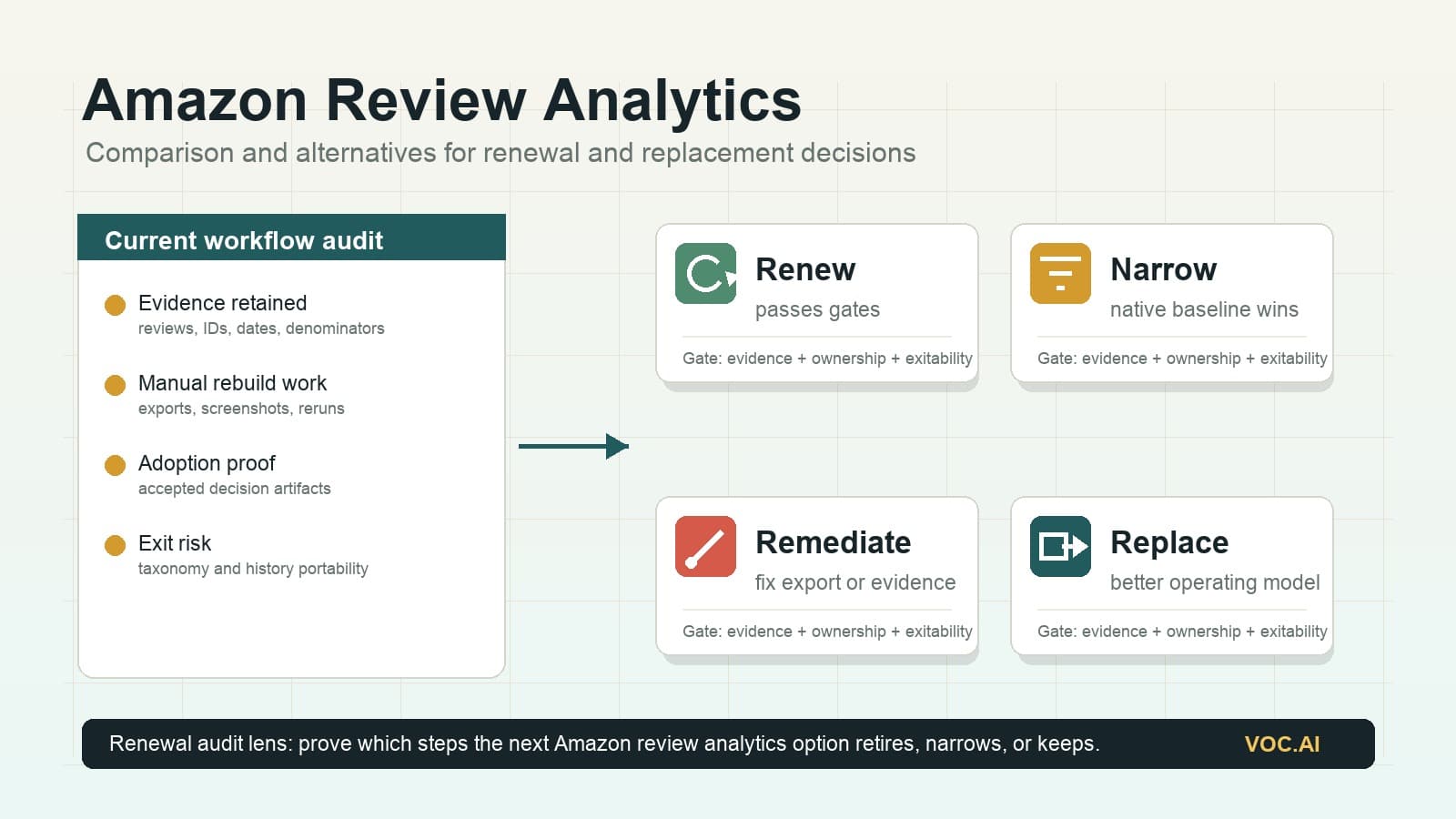
The August 11 update adds a renewal and replacement layer: a practical way to decide whether to keep the current workflow, narrow it to Amazon-native coverage, add a specialist layer, or replace it with an API-led process. Amazon-native and seller-suite review analytics are increasingly connected to Amazon's own customer-feedback surfaces and API contracts, so the first question is less about whether a tool can show topics, and more about whether it can preserve the corpus, evidence, denominator, comparison logic, handoff, and migration trail your team needs after the native summary appears.
What to compare first: interface, evidence, or operating model?
Most buyers start with interface screenshots because screenshots are easy to compare. That is the wrong first layer for Amazon review analytics. A polished interface can still hide the review set, merge distinct complaints, or make competitor comparisons with inconsistent windows.
Use this order instead.
| Buying layer | What it answers | What to inspect | Failure mode if skipped |
|---|---|---|---|
| Operating model | Who owns data access, taxonomy, QA, and recurring work? | Native tool, suite, specialist platform, AI-assisted workflow, or API pipeline | The team buys a tool that does not fit the cadence or owner |
| Evidence layer | Can every important finding be traced to source reviews and denominator rules? | Corpus manifest, review excerpts, confidence notes, counterexamples, date windows, and filters | Stakeholders challenge conclusions and analysts rebuild the work manually |
| Decision layer | Can the output become a real action artifact? | Product brief, listing brief, quality report, competitor gap table, alert, ticket, or API response | The dashboard is interesting but does not change what the team does |
| Exit layer | Can the team leave without losing taxonomy, evidence, or history? | Exports, schema, IDs, version history, and migration rehearsal | The chosen workflow becomes expensive to change even if quality slips |
This order changes how you compare alternatives. Manual spreadsheets may beat a tool when the decision is narrow and the analyst must read every review. A broad seller suite may beat a specialist when keyword and listing workflows matter more than deep feedback evidence. A specialist may beat both when review intelligence is a weekly cross-functional input. An API pipeline may beat the interface category when the destination is an internal system.
August 2026 market update: compare native topics separately from decision evidence
Amazon review analytics comparisons used to separate “native tools” from “third-party seller tools” cleanly. That line is less clean now. Amazon's official Customer Feedback API exposes aggregated customer feedback topics for eligible ASIN workflows, and Helium 10's current Review Insights documentation says the feature is powered by Amazon's Customer Feedback API. In other words, a seller-suite review module may now be closer to an Amazon-native topic layer than to a fully independent review-mining workflow.
That is useful, but it changes the evaluation. API-powered topic summaries can reduce setup friction and improve platform legitimacy. They do not automatically answer whether your team can audit every claim, compare competitors with the same denominator, export the evidence, or connect review findings to a product, listing, quality, or monitoring decision.
Use this split before shortlisting tools.
| Layer | What it proves | What it does not prove |
|---|---|---|
| Native topic layer | Amazon has recognized positive or negative topics, review snippets, rating impact, trends, or API-returned topic data for the eligible ASIN context | That the workflow supports your custom taxonomy, multi-ASIN competitor denominator, cross-channel evidence, or export/audit requirements |
| Seller-suite workflow | The review view sits next to keyword, listing, product-research, or operations tools your team may already use | That review analytics is deep enough to be a recurring insight system rather than a supporting module |
| Specialist analytics layer | The system is built around recurring evidence synthesis, traceability, comparison, and handoff | That it replaces every seller-suite job, or that it should win when a native view already answers a narrow question |
| API or warehouse layer | The organization can embed review topics or analyzed fields into its own systems | That engineering ownership, QA, evidence storage, and maintenance are cheaper than buying a maintained workflow |
For Amazon review analytics: comparison and alternatives work, this is the practical implication: do not treat “powered by Amazon data” as either a disqualifier or a complete answer. Treat it as one source layer. The winner still has to pass the evidence packet, acceptance test, cost model, and exitability drill below.
Minimum viable evidence packet
Before you run demos, define the evidence packet every alternative must produce. This packet should be small enough to create in one work session and complete enough that a product, marketing, quality, or operations owner can challenge it.
| Packet field | Required standard |
|---|---|
| Corpus manifest | ASINs, marketplace, extraction date, review count, date window, star filters, language filters, variant handling, and exclusions |
| Theme table | Ranked themes with plain-English labels, mechanism, sentiment, affected product or competitor, and count or share with denominator |
| Evidence appendix | Exact review excerpts for top claims, at least one counterexample per major theme, rating, date, ASIN, marketplace, and source ID where available |
| Recent-change view | A recent period compared with a baseline period using the same taxonomy and visible denominator |
| Decision artifact | One concrete output: listing copy brief, product issue memo, competitor gap table, quality investigation, monitoring alert, or API response |
| Uncertainty log | Ambiguous reviews, thin evidence, suspicious patterns, taxonomy disagreements, and claims that need validation with support, returns, or sales data |
| Reproduction note | The settings, prompt, saved view, request, or workflow version another analyst needs to rerun the same analysis |
If an alternative cannot produce this packet, it may still be useful for exploration, but it should not be treated as a production review analytics system.
August 2026 procurement packet: what to collect before the shortlist meeting
Most Amazon review analytics comparisons stop with a feature table. That is not enough for a commercial investigation. A buyer needs a packet that lets product, ecommerce, research, operations, engineering, and security stakeholders inspect the same evidence before a finalist is advanced.
Build the packet before the shortlist meeting, not after procurement has emotionally picked a winner.
| Packet section | What to include | Why it changes the comparison |
|---|---|---|
| Decision question | One decision the workflow must support, such as a product issue memo, listing-language brief, competitor gap report, or monitoring alert | Prevents vendors from optimizing the demo around generic dashboards |
| Product scope | Focal ASINs, competitor ASINs, marketplace, language, date window, child-variation handling, and review-count target | Makes coverage gaps visible before the proof starts |
| Evidence rule | Exact review text, source ID where available, ASIN, rating, date, marketplace, filter, denominator, and counterexample expectations | Separates analytics from untraceable summaries |
| Native baseline | What Amazon-native review insights or Customer Feedback API topic data already provides for the same product scope | Stops the team from paying for a workflow that only repackages an available baseline |
| Shortlist rationale | Why each finalist remains in the comparison: native, seller suite, specialist platform, AI-assisted workflow, or API pipeline | Keeps the shortlist balanced across operating models instead of five similar dashboards |
| Demo artifacts | Screenshots are allowed, but each finalist must also provide an export, brief, table, alert, ticket, or API sample that can be reviewed outside the call | Tests whether the workflow survives outside the interface |
| Stakeholder notes | Product, listing, quality, support, research, engineering, and security objections with owner and follow-up status | Makes the buying process cross-functional without turning it into vague consensus |
| Gate result | Pass, conditional pass, or fail for coverage, traceability, comparison logic, trend logic, workflow output, governance, cost, and exitability | Prevents a high total score from hiding a disqualifying weakness |
The packet should be short enough to review in one meeting. If it takes a day to explain, the comparison is still too abstract.
Use a stakeholder review agenda
Run the shortlist meeting with a fixed agenda:
- Confirm the decision question. If stakeholders disagree about the decision, pause the tool comparison.
- Inspect the native baseline. Identify which questions Amazon-native topics, snippets, trends, or API-returned topic data already answer.
- Review the evidence packet. Open at least three source reviews behind the top claims and one counterexample.
- Challenge the comparison. Ask whether focal and competitor products use the same denominator, window, and taxonomy.
- Review the output artifact. Decide whether a non-analyst owner could act on it without rebuilding the work.
- Check operating ownership. Name who maintains taxonomy, QA, exports, alerts, integrations, permissions, and re-runs.
- Set the proof gates. Decide which failure would remove the finalist during the 14-day proof.
This agenda is deliberately practical. It moves the conversation from "which tool is best?" to "which operating model can produce a defensible decision artifact for our product set?"
Add stakeholder-specific questions
Different stakeholders should challenge different parts of the Amazon review analytics workflow.
| Stakeholder | Question to ask | Evidence that should satisfy them |
|---|---|---|
| Product manager | Which theme changes the roadmap, and which reviews prove the mechanism? | Theme table with exact review evidence, counterexamples, confidence, and owner-ready recommendation |
| Ecommerce or listing owner | Which buyer phrases should affect title, bullets, images, or A+ content? | Verbatim phrase clusters with rating, date, ASIN, marketplace, and decision notes |
| Quality or operations owner | Is the issue linked to product design, packaging, fulfillment, expectations, or usage? | Segmented complaint mechanisms, recent-change view, variant context, and open validation questions |
| Research or insights lead | Does the taxonomy preserve meaning across products and time? | Codebook, human-coded reference sample, disagreement log, and repeatability result |
| Engineering or data owner | Can the data move into internal systems without losing evidence? | Export schema, API sample, IDs, timestamps, versioning, limits, and error behavior |
| Security or compliance reviewer | Are access, retention, permissions, audit history, and review-handling practices acceptable? | Vendor documentation, role controls, deletion behavior, data-flow notes, and policy exceptions |
| Finance or operations buyer | Does the workflow reduce repeated labor enough to justify the cost? | Annual operating-cost model, setup estimate, QA estimate, and cost per accepted decision artifact |
If a finalist cannot satisfy a stakeholder question, label the gap precisely. A missing API field, unclear marketplace scope, or unexportable evidence appendix is easier to resolve than a vague concern that the tool feels incomplete.
August 2026 renewal audit: decide whether to keep, narrow, add, or replace
Many teams do not arrive at Amazon review analytics: comparison and alternatives with a blank slate. They already have a spreadsheet, a seller-suite module, a native Amazon workflow, a review summarizer, or a half-finished internal pipeline. The harder question is not "Which tool should we buy?" It is "Do we have enough evidence to renew the current workflow, or should we replace part of it?"
Run a renewal audit 30 to 45 days before contract renewal, annual planning, or a major product-line review. The audit should use the same evidence standard as a new purchase, but it should also inspect historical continuity: which taxonomies, source-review links, exports, dashboards, alerts, and decisions would survive if the workflow changed.
| Renewal finding | Decision it points to | What to inspect before acting |
|---|---|---|
| Native Amazon topics answer the main product question and stakeholders rarely use deeper outputs | Narrow the workflow around Amazon-native review insights or API-backed topics | Eligibility, marketplace coverage, topic freshness, export needs, and whether the native view still preserves enough decision evidence |
| Seller-suite review analytics is useful only when paired with keyword, listing, or product-research workflows | Keep it as a supporting module, not the system of record | Whether review evidence can still be exported, cited, and compared outside the suite |
| Analysts rebuild evidence appendices manually after every dashboard review | Add a specialist review intelligence layer or redesign the evidence workflow | Theme traceability, review-level IDs, export schema, saved views, and owner handoff time |
| Product, quality, and listing teams use different taxonomies for the same reviews | Consolidate taxonomy and QA before expanding tools | Codebook ownership, disagreement logs, label versioning, and mapping from old labels to new labels |
| Internal teams need review data inside BI, tickets, alerts, or proprietary models | Compare specialist API access with a custom pipeline | API fields, rate limits, request history, evidence storage, schema versioning, and engineering ownership |
| Cost is rising but accepted decision artifacts are flat | Renegotiate, narrow scope, or replace | License/API cost, analyst hours, QA time, engineering time, monitored ASINs, and accepted deliverables per month |
The renewal audit prevents a common failure: renewing a tool because it still produces attractive dashboards while the actual decision workflow has moved elsewhere. If the evidence is no longer used, the workflow is not merely under-adopted. It is no longer the right operating model.
Use a current-state evidence ledger
Before you compare replacement options, inventory what the current workflow already does. Use one row per recurring decision, not one row per feature.
| Ledger field | What to record |
|---|---|
| Decision | Product revision, listing rewrite, competitor gap, quality investigation, monitoring alert, or executive readout |
| Current input | Native topic view, review export, seller suite, specialist dashboard, API response, spreadsheet, or AI-assisted analysis |
| Evidence retained | Review excerpts, source IDs, dates, ASINs, marketplace, denominator, counterexamples, and saved filters |
| Output retained | Brief, CSV, ticket, dashboard, alert, API payload, codebook, or presentation |
| Rebuild work | Manual cleanup, screenshot assembly, prompt reruns, spreadsheet reconciliation, stakeholder explanation, or engineering fix |
| Adoption proof | Who used the output, what decision changed, and whether the decision artifact was accepted without rework |
| Replacement risk | Data that cannot be exported, taxonomy history that may be lost, integrations that need rework, or legal/security review needed |
This ledger gives renewal reviewers a better comparison baseline than contract cost alone. A cheap workflow that requires two days of manual reconstruction for every major decision may cost more than a higher-priced system that preserves evidence, ownership, and repeatability.
Score the current workflow against the same gates as new finalists
Do not give the incumbent a free pass. Score it against the same minimum gates you would apply to a new Amazon review analytics alternative:
- Can the team see exactly which reviews, ASINs, marketplaces, dates, filters, and variants were analyzed?
- Can every important theme be traced to original customer language and at least one counterexample?
- Can the same taxonomy compare a focal product, competitor, and recent period without hidden denominator changes?
- Can a non-analyst owner use the output without rebuilding the work?
- Can the evidence, taxonomy, and decision history be exported before renewal?
- Can a repeated run explain changes caused by new reviews, configuration edits, or model changes?
- Can the workflow prove value through accepted product, listing, quality, or monitoring artifacts?
If the incumbent fails a non-negotiable gate, the renewal decision should become a controlled replacement or remediation plan. If it passes the gates but carries extra unused modules, the right move may be narrowing scope rather than switching vendors.
Set replacement triggers in advance
Replacement should not depend on whoever is most frustrated in the renewal meeting. Define triggers before the audit:
| Trigger | Why it matters | Example threshold |
|---|---|---|
| Evidence loss | Stakeholders cannot trust or revisit the finding | More than 10% of high-priority claims lack source-review evidence or denominator context |
| Workflow rebuild | The tool produces outputs that require repeated manual reconstruction | More than one workday per month spent assembling evidence appendices from screenshots, exports, or reruns |
| Coverage mismatch | The current workflow no longer matches where the business competes | Required marketplaces, competitors, languages, variants, or product lines are missing from recurring analysis |
| Adoption failure | The tool is watched but not used for decisions | Fewer than two accepted decision artifacts per quarter for a recurring-review workflow |
| Governance gap | Access, retention, exports, API handling, or audit history do not fit policy | Security, legal, or data owners cannot approve the live workflow without exceptions |
| Exit risk | Switching would lose taxonomy, evidence, or historical continuity | No usable export of evidence, codebook, decision history, or integration mappings before renewal |
These thresholds are examples, not universal standards. The point is to move the renewal conversation from preference to observed work.
Decide between four renewal outcomes
At the end of the audit, pick one of four outcomes:
- Renew as-is. Use this only when the workflow passes evidence, output, adoption, governance, cost, and exitability gates.
- Renew with narrower scope. Keep the tool for the jobs it actually supports, and remove inflated expectations from the operating model.
- Renew with remediation. Keep the workflow only if specific gaps are fixed by a named date, such as export schema, evidence appendix, taxonomy controls, or stakeholder handoff.
- Replace or rebuild. Start a replacement proof when the incumbent cannot support the current decision workflow, cannot export the evidence trail, or costs more than its accepted decision artifacts justify.
This is where Amazon review analytics comparisons become more honest. A native tool can be the right answer after a specialist pilot. A seller suite can stay in the stack as a supporting module. A specialist platform can become the system of record. An API pipeline can win when evidence needs to flow into proprietary systems. The renewal audit forces the choice to follow the work.
Amazon review analytics: comparison and alternatives by operating model
For Amazon review analytics: comparison and alternatives work, operating model matters because each option moves ownership to a different team.
| Approach | Best for | Main strength | Main limitation | Choose it when |
|---|---|---|---|---|
| Manual reading and spreadsheets | One-off analysis of a small review set | Maximum control over what gets coded | Slow, difficult to repeat, easy to drift between analysts | You have one narrow question and can inspect the source reviews yourself |
| General-purpose AI assistant | Fast exploration and draft taxonomy creation | Flexible prompting and rapid synthesis | Data collection, traceability, and repeatability depend on your process | You already have a lawful review dataset and need a first-pass analysis |
| Amazon-native review insights | Product or niche questions inside Seller Central | Native context and low setup friction | Access, scope, exports, and workflow flexibility may not match every team | Your decision lives mainly inside Amazon and native coverage is sufficient |
| Broad Amazon seller suite | Teams that also need keyword, listing, advertising, or product-research tools | Multiple seller workflows in one subscription | Review analysis may be one module rather than the center of the system | Consolidation matters more than deep review-analysis workflow design |
| Specialized platform | Repeatable review intelligence across products and competitors | Deeper theme analysis, evidence retrieval, comparison, and monitoring | Adds a dedicated system to the stack | Review language drives recurring product, listing, support, or research decisions |
| Custom API pipeline | High-volume or embedded workflows | Control over data models, automation, and internal integrations | Engineering, governance, QA, and maintenance burden | Review intelligence must feed proprietary dashboards, models, or operating processes |
A specialized platform and a custom API pipeline are often evaluated together, but they solve different ownership problems. One buys a maintained workflow; the other builds one.
Start with the decision, not the dashboard
Before comparing tools, write one sentence that defines the decision.
For example:
- Which recurring complaints should change our next product revision?
- Which buyer phrases should influence our listing copy?
- Is a sudden rating decline linked to packaging, quality, expectations, or fulfillment?
- Which competitor weakness appears often enough to investigate?
- Which review themes are growing after a supplier or packaging change?
This matters because “analyze reviews” is not a usable requirement. Different decisions need different coverage, time windows, comparison sets, and evidence standards.
A listing-copy project may need exact phrases and usage scenarios. A quality investigation needs dates, variants, batches, and trend changes. A sourcing project needs competitor and category coverage. A weekly monitoring workflow needs alerts, ownership, and recheck dates.
If the tool cannot preserve the link between a theme and the reviews behind it, the output is a suggestion—not evidence.
The 10 criteria that separate useful analytics from polished summaries
Use these criteria to compare Amazon review analytics alternatives.
1. Review coverage
Ask what the analysis actually includes:
- One ASIN or a portfolio?
- Your products, competitors, or category-level sets?
- Which marketplaces and languages?
- What date range?
- Parent listings, child variants, or both?
- All available reviews or a limited selection?
Coverage changes the conclusion. A native or API-powered topic feed can be a strong baseline when it matches your ASIN, marketplace, language, and eligibility constraints. It is still a different evidence base from a custom full-corpus or multi-ASIN analysis if the workflow cannot show the same denominator, filters, date window, and exclusions your decision requires.
The right question is not “Does it analyze reviews?” It is “Which reviews determine the answer?”
2. Theme quality
Basic sentiment divides feedback into positive, neutral, and negative. Useful analytics should also identify what the sentiment is about.
Look for themes such as:
- Durability
- Fit or sizing
- Setup friction
- Packaging damage
- Missing accessories
- Battery life
- Material feel
- Expectation mismatch
- Use case or buyer type
Theme labels should be specific enough to route. “Negative product feedback” has no owner. “Lid cracks after repeated dishwasher cycles” can go to product and quality teams.
3. Verbatim evidence
A strong system lets you move from a chart to the relevant review excerpts. This helps teams:
- Check whether the label matches the language
- See context that a summary compressed away
- Identify the phrases customers naturally use
- Find exceptions and counterexamples
- Avoid presenting generated wording as a customer quote
Evidence retrieval is one of the clearest differences between review analytics and generic text summarization.
4. Comparison logic
Competitor review analysis should compare like with like. Check whether you can control:
- Product set
- Time window
- Star range
- Variant or model
- Marketplace
- Theme definition
- Review volume differences
A competitor may have more complaints simply because it has more reviews. A newer product may look better because fewer long-term durability problems have had time to appear. Counts without denominators can mislead.
5. Time trends
An all-time theme count can hide the event you need to see. Look for the ability to compare periods and detect changes after:
- A supplier transition
- A packaging revision
- A listing rewrite
- A price change
- A seasonal demand spike
- A product update
Amazon describes Customer Review Insights as showing positive and negative topics, topic impact on star ratings, review snippets, and six-month topic trends inside Product Opportunity Explorer. That native view may be enough for some product and niche questions.
6. Filters and segmentation
Useful filters depend on the decision, but common ones include rating, date, product, competitor, variation, marketplace, language, and theme.
Do not treat a filter-rich dashboard as automatically rigorous. Filters are useful only if the underlying coverage is clear and the resulting evidence can be inspected.
7. Workflow outputs
The output should fit the next action. Examples include:
- A product requirements input
- A listing-language brief
- A packaging issue report
- A support FAQ update
- A competitor gap table
- A monitoring alert
- A weekly decision memo
If the workflow ends with “interesting dashboard,” the team still has to rebuild the analysis before acting.
8. Repeatability
Can another person rerun the same analysis next week and understand what changed?
Repeatability requires more than saved prompts. It may include a stable taxonomy, named product set, date window, filters, analysis version, evidence links, and exportable results.
This is where manual analysis and general AI assistants often need additional process design. They can be powerful, but the team owns the method.
9. Integration and export
Consider where the findings need to go:
- CSV or spreadsheet
- Product management system
- Business intelligence dashboard
- Data warehouse
- Support platform
- Internal research repository
- Automated alerting workflow
Amazon's Customer Feedback API can return positive and negative review topics for an ASIN to authorized applications. VOC AI also describes a Review Analysis API for original review fields and AI-analyzed conclusion data. An API becomes relevant when the destination matters as much as the analysis interface.
10. Governance and compliance
Review analytics should help you learn from customer feedback, not manipulate it.
The FTC Consumer Reviews and Testimonials Rule addresses practices including fake reviews, sentiment-conditioned incentives, undisclosed insider reviews, and review suppression. The rule took effect on October 21, 2024.
Your evaluation should cover data access, retention, user permissions, exports, auditability, and how generated summaries are separated from original customer language. It should also confirm that review collection and downstream use follow applicable platform terms and internal policy.
Run a reproducibility benchmark before comparing feature lists
Feature checklists tell you what a product claims to do. A reproducibility benchmark tests whether the approach can produce a stable, inspectable answer when the input, question, and rules stay the same.
This matters because Amazon review analytics often combines several variable steps: corpus selection, deduplication, language handling, theme assignment, sentiment classification, denominator choice, comparison logic, and generated explanation. Two attractive dashboards can reach different conclusions from the same reviews. The useful question is not whether they disagree. It is whether you can locate and explain the disagreement.
Build one benchmark pack before vendor demos or trials. Use the same pack for manual analysis, native tools, seller suites, specialized platforms, and API-led workflows.
Assemble a fixed test pack
Choose a focal product set that includes ordinary reviews and difficult cases:
- One focal ASIN with enough review history to show recurring themes
- One close competitor with a similar use case
- One product with variants, bundles, or meaningful configuration differences
- A fixed marketplace and date window
- Reviews with mixed sentiment, sarcasm, conditional praise, and multiple issues
- Reviews that mention packaging, fulfillment, expectations, and product performance in the same text
- At least five reviews that a human analyst considers ambiguous
Record the ASINs, marketplace, extraction date, review count, date window, filters, and any exclusions. If a workflow cannot reveal the analyzed corpus or its denominator, mark that as a measurement limitation before reviewing its output.
For API-led options, preserve the request and response schema alongside the result. Amazon maintains a public Customer Feedback API model, which provides a useful example of the versioned contracts technical buyers should expect to inspect.
Ask every option the same five questions
Do not let each demo choose the question that makes its interface look strongest. Require every finalist to answer the same set:
- What are the three most important recurring complaint mechanisms for the focal ASIN?
- Which complaint changed most in the recent period compared with the baseline period?
- Which theme separates the focal ASIN from the competitor most clearly?
- Which finding is most uncertain, and what evidence would reduce that uncertainty?
- What single product, listing, or monitoring action should an owner take next?
The questions deliberately test different capabilities. The first tests coverage and taxonomy. The second tests denominators and time windows. The third tests comparison logic. The fourth tests confidence and counterevidence. The fifth tests whether the output can cross the boundary from analysis into a decision workflow.
Create a human-coded reference set
Select 30 to 50 reviews from the test pack and have two people code them independently. Use a compact schema:
| Field | Example rule |
|---|---|
| Primary theme | The main customer outcome or problem mechanism |
| Secondary theme | A distinct additional issue, not a synonym of the primary theme |
| Sentiment | Positive, negative, mixed, or unclear at the theme level |
| Mechanism | What caused the praised or criticized outcome |
| Evidence span | The exact words supporting the code |
| Confidence | High, medium, or low with a short reason |
| Context | Variant, usage scenario, packaging, fulfillment, or expectation where available |
Resolve disagreements and keep both the original codes and the adjudicated result. This is not a perfect ground truth. It is a transparent reference that exposes how each approach handles known edge cases.
If your team needs a broader procurement framework, use this benchmark with a customer review analysis tool scorecard rather than replacing judgment with one accuracy number.
Score agreement, stability, and traceability separately
A single “accuracy” score hides important failure modes. Score at least these four dimensions from 0 to 2:
| Benchmark dimension | 0 | 1 | 2 |
|---|---|---|---|
| Theme agreement | Important human-coded themes are missed or materially distorted | Major themes appear, but boundaries or mechanisms are inconsistent | Major themes and mechanisms align well enough to support the decision |
| Run-to-run stability | Repeating the same test produces materially different priorities without explanation | Priorities are similar but labels, counts, or supporting evidence move | Repeated runs preserve the conclusion or clearly explain version-driven change |
| Evidence traceability | Findings cannot be traced to individual reviews or approved source references | Some examples are visible, but the denominator or full evidence set is unclear | Each important finding has retrievable evidence, corpus context, and calculation basis |
| Disagreement diagnosis | The team cannot locate why the result differs from the reference | Differences can be found with manual reconstruction | The workflow exposes filters, taxonomy, confidence, exceptions, and affected evidence |
Run the same benchmark twice without changing the corpus or instructions. If the output changes, ask whether the difference came from a model version, taxonomy change, corpus refresh, random generation, hidden filter, or calculation rule. A stable wrong answer is not good, but an unstable answer that cannot be explained is difficult to govern.
Keep a disagreement log
For every material mismatch, record:
- The claim or ranked theme that changed
- The reviews or records affected
- Whether the difference is a coverage, coding, sentiment, denominator, recency, or explanation issue
- Whether a human reviewer can correct it
- Whether the correction persists in the next run
- Whether the mismatch changes the recommended action
This log is more useful than collecting isolated screenshots. It shows whether the workflow improves through taxonomy edits, exclusions, prompt changes, data corrections, or product configuration—and whether those improvements survive beyond one analyst's session.
Define a pass condition tied to the decision
Do not require every theme label to match word for word. Require the approach to preserve the decision-relevant meaning.
For example, “lid cracks during shipping” and “packaging-related lid damage” may be acceptable variants if both point to the same evidence and owner. “Poor quality” is not an acceptable substitute when it merges lid damage, battery failure, and sizing complaints into one vague bucket.
A finalist passes when it can:
- Reproduce the major decision-relevant themes
- Explain important differences from the reference set
- Preserve source evidence and denominators
- Produce a stable priority order across repeated runs
- Turn the result into the required deliverable without hidden reconstruction work
This benchmark does not eliminate the need for a production pilot. It makes the pilot more diagnostic. You enter the 14-day proof knowing which edge cases, controls, and evidence gaps require attention.
Alternative 1: manual review reading and spreadsheets
Manual analysis is not obsolete. It is often the best starting point when the decision is narrow and the review set is manageable.
When it works
- You are evaluating a small number of products
- You need to learn the category vocabulary before automating
- The decision is high stakes and requires close reading
- You want to create a first taxonomy
- Analysis is occasional rather than recurring
Where it breaks
- Coding changes as the analyst learns
- Duplicate themes and inconsistent labels accumulate
- Review traceability becomes tedious
- Comparing periods or competitors takes repeated cleanup
- The workbook becomes difficult for other teams to reuse
A practical manual setup uses one row per review, immutable source fields, separate analyst-coded fields, and a codebook that defines every theme. Keep customer quotes separate from summaries.
Alternative 2: a general-purpose AI assistant
A general AI assistant can rapidly classify, summarize, and explore review text you provide. It is a useful alternative when your team already controls the dataset and is willing to own the method.
When it works
- You need a fast first-pass taxonomy
- The analysis is exploratory
- A human will inspect the evidence
- You can manage chunking, prompts, and outputs
- You do not need an always-on monitoring system
Where it breaks
- Input limits can fragment the analysis
- The model may merge distinct mechanisms into broad themes
- Results can change with prompts or model versions
- Citations to source rows require deliberate implementation
- Data collection and platform access remain separate problems
Use structured output fields such as theme, mechanism, sentiment, evidence_id, product, date, and confidence. Then audit a sample of classifications before using the results for a product or marketing decision.
Alternative 3: Amazon-native review insights
Amazon's Customer Review Insights sits inside Product Opportunity Explorer in Seller Central. Amazon says it groups common positive and negative topics, shows snippets, indicates how topics affect star ratings, and displays topic trends.
When it works
- The question is centered on Amazon products or niches
- Your team already works in Seller Central
- Native topic and trend views answer the decision
- You want low setup overhead
Where to check fit
- Eligibility and marketplace availability
- Exact product and niche coverage
- Export and integration needs
- Historical depth
- Custom taxonomy requirements
- Cross-channel or non-Amazon feedback needs
Native tools are a strong baseline. Compare paid alternatives against the native answer you can already get, not against an empty spreadsheet.
Alternative 4: a broad Amazon seller suite
Seller suites combine multiple jobs such as product research, keyword analysis, listing workflows, advertising, and operations. Review analysis may be included as one feature.
The August 2026 nuance is that some seller-suite review features now position themselves around Amazon's official customer-feedback data rather than only around exported review text. That can be a meaningful advantage for teams that want a Seller Central-adjacent signal without building an API workflow. It also means you should verify whether the feature is primarily a native-topic view, a review-text analysis workflow, or a deeper decision-evidence system.
When it works
- The same users need several seller workflows
- Tool consolidation reduces operational friction
- Review analysis supports, rather than defines, the job
- A consistent suite is more valuable than maximum depth in one module
- Amazon-native topic coverage is enough for the question and the suite already owns the surrounding workflow
Where to check fit
- Whether the feature uses Amazon-native topic data, review-text exports, proprietary analysis, or a mix
- The exact ASIN, marketplace, language, and eligibility scope
- Competitor and multi-ASIN comparison
- Review exports
- Theme customization
- Evidence traceability
- Monitoring and alerts
- Whether the needed feature is included in the relevant plan
Do not compare suite prices using the review feature alone. Compare the total set of jobs your team will actually use.
Alternative 5: a specialized review analytics platform
A specialized platform makes sense when customer language is a recurring operating input rather than an occasional research task.
When it works
- Several teams use review evidence
- You compare products, competitors, or categories repeatedly
- Theme consistency matters over time
- Exact customer wording informs listings and product decisions
- Monitoring and reusable reports are part of the workflow
VOC AI's VOC Analysis is one example of this approach. It is designed to cluster feedback by pain point, expectation, and feature mention; connect recurring complaints to product and listing decisions; and use review intelligence across dashboards, agent workflows, and API access.
The buying question is not whether a specialist can create more charts. It is whether it reduces the repeated work between source review, supported conclusion, owner, and next action.
Alternative 6: a custom API pipeline
A custom pipeline is the highest-control alternative and the easiest to underestimate.
When it works
- Review intelligence must be embedded in an internal product
- You need a proprietary taxonomy or scoring model
- Large product sets require scheduled processing
- Outputs must join sales, returns, support, or quality data
- Engineering and data governance owners are available
What you own
- Lawful data access
- Schemas and identity resolution
- Deduplication and language handling
- Model selection and evaluation
- Theme versioning
- Evidence storage
- Permissions and retention
- Monitoring and maintenance
The build-versus-buy comparison should include ongoing QA and ownership, not just the first prototype.
Named Amazon review analytics tools and alternatives
The categories above are more useful than a generic “top tools” list because several products that appear together in search results solve different jobs. Still, buyers need names for a practical shortlist.
Use the following map as a starting point, not as a final ranking. Product access, marketplace coverage, exports, and packaging can change. Verify the current workflow with the vendor and test every finalist on the same ASIN set.
| Option | Operating model | Best starting use case | What to verify before shortlisting |
|---|---|---|---|
| Amazon Customer Review Insights | Amazon-native analysis inside Product Opportunity Explorer | Establishing a native baseline for topics, snippets, rating effects, and trends | Account eligibility, marketplace and niche coverage, export options, historical depth, and whether the native taxonomy answers your decision |
| Amazon Customer Feedback API | Amazon API input for a governed workflow | Bringing eligible customer-feedback topics into internal reporting or applications | Available endpoints and data scope, weekly refresh behavior, language and marketplace limits, authorization, retention rules, engineering ownership, downstream evidence storage, and ongoing maintenance |
| Helium 10 Review Insights | Seller-suite feature using Amazon Customer Feedback API data | Combining Amazon feedback topics with other seller research and listing workflows | Which plans and marketplaces include the needed workflow, whether API topic data is enough for your decision, export depth, custom comparison controls, and whether themes remain linked to source evidence |
| SellerSprite Review Analysis | Amazon research suite with review-analysis workflows | Competitor and product review research within a seller-research stack | ASIN and marketplace coverage, comparison controls, date filters, exports, taxonomy behavior, and how the output fits the team’s existing research process |
| ReviewMeta | Review-authenticity screening | Checking whether a review corpus may contain suspicious patterns before deeper interpretation | Whether the output addresses authenticity screening rather than product-theme analysis, the methodology used, and how the adjusted view will influence the decision |
| General-purpose AI assistant | Flexible analysis layer over a dataset you already control | Drafting a taxonomy, extracting evidence, or testing a narrow question quickly | Lawful data access, input limits, repeatability, prompt and model versioning, review-level citations, and human audit procedures |
| VOC AI Voice of Customer Analysis | Specialized review and feedback intelligence platform | Recurring analysis across products, competitors, teams, or feedback channels | Source coverage, evidence traceability, taxonomy controls, monitoring, collaboration, exports, API fit, and the exact handoff from finding to decision |
This table is deliberately not a one-to-seven leaderboard. Amazon-native insights may be the best answer for a narrow Seller Central question. ReviewMeta may be useful as an authenticity check but is not a substitute for theme analysis. A seller suite may win when consolidation matters. A specialist or API workflow becomes more relevant when the same evidence must support recurring product, marketing, research, and operations decisions.
The important 2026 adjustment is to avoid double-counting the same native signal. If a seller-suite module and a direct API workflow are both drawing from Amazon's Customer Feedback API, compare them on workflow, exports, controls, and operating ownership—not on the assumption that they reveal two entirely different underlying datasets.
For a renewal or replacement decision, add one more column to your internal copy of this table: what would this option retire? If the answer is "nothing," you may be adding another review surface instead of replacing work. A new Amazon review analytics alternative should retire manual evidence assembly, inconsistent taxonomies, screenshot-based reporting, slow export cleanup, or a dashboard that no one uses for a decision.
Compare named tools using one shared test pack
Create a test pack before opening vendor demos:
- One focal ASIN: the product with a real decision pending.
- Two comparison ASINs: one close competitor and one meaningfully different alternative.
- One fixed window: for example, the most recent 90 or 180 days, plus an all-time reference view.
- Five known reviews: examples your team has already coded, including ambiguous or mixed-sentiment comments.
- One required deliverable: a listing brief, product issue memo, launch-risk report, or competitor comparison.
- One evidence rule: every important claim must link back to exact review text and preserve ASIN, date, rating, and marketplace context.
Then ask every finalist to answer the same questions:
- What changed recently rather than merely appearing often all time?
- Which complaint mechanisms separate the focal ASIN from the two alternatives?
- Which conclusion becomes weaker when duplicate, vague, or suspicious reviews are removed?
- Which source reviews support the top three findings?
- What decision artifact can be exported and handed to an owner?
This turns a feature comparison into a controlled workflow comparison.
Choose an alternative by constraint
If your shortlist is still too broad, start with the constraint that is hardest to change.
| Hard constraint | Default option to test first | Why |
|---|---|---|
| No budget and one narrow decision | Manual coding or a controlled AI-assisted spreadsheet | Keeps the workflow small while preserving direct access to the evidence |
| Seller Central is the center of the job | Amazon-native insights | Tests whether the platform’s own view already answers the question with minimal setup |
| The team wants one seller operating suite | Broad seller suite | Consolidates several workflows when review analytics is only one part of the job; verify whether its review layer is native/API-topic based or deeper evidence analysis |
| Review evidence is used every week by multiple teams | Specialized review analytics platform | Prioritizes repeatability, shared taxonomy, traceability, monitoring, and reusable outputs |
| Review intelligence must live inside an internal product | Customer Feedback API or another governed API pipeline | Provides control over schemas, integrations, permissions, and proprietary decision logic |
| Trust in the review corpus is the immediate concern | Authenticity-screening tool before theme analysis | Separates the question “Can we trust this corpus?” from “What are customers experiencing?” |
| The team must combine reviews with support, returns, surveys, or social feedback | Cross-channel Voice of Customer platform or warehouse-led pipeline | Keeps the decision from being constrained to one self-selected feedback source |
The default is only a first test. A hard constraint narrows the field; the same-ASIN proof determines the winner.
Reduce the market to three to five finalists
A comparison gets less useful when every possible product stays in the spreadsheet. The goal of the first pass is not to select a winner. It is to remove approaches that cannot support the required decision.
In an Amazon review analytics: comparison and alternatives shortlist, the strongest set usually mixes operating models rather than collecting several tools that solve the same job.
Start with six non-negotiable filters:
- Coverage: the approach can analyze the required ASINs, marketplaces, languages, date range, and variants.
- Evidence: important themes can be traced back to exact review text.
- Comparison: products can be compared with the same time window, denominator, and taxonomy.
- Workflow: the output can reach the owner who must act on it.
- Governance: data access, retention, permissions, and review handling fit your policy.
- Operating fit: your team can run, audit, and maintain the workflow after the pilot.
Eliminate any option that fails a true non-negotiable. Do not let a strong demo, low introductory price, or long feature list compensate for a missing requirement.
Your shortlist should normally contain different operating models, not five nearly identical vendors. A useful three-to-five finalist set might include:
- Amazon-native review insights as the baseline
- A broad seller suite if consolidation matters
- One or two specialized review analytics platforms
- A general AI workflow if the team already controls the dataset
- A custom API path if the analysis must be embedded
Including a baseline prevents a paid product from winning merely because it is more polished than doing nothing. Including a credible build or manual alternative also exposes which part of the paid workflow creates the value.
Use a weighted Amazon review analytics scorecard
Equal weighting hides the decision. A listing team, quality team, research group, and data platform team should not produce the same score.
For Amazon review analytics: comparison and alternatives procurement, set weights before demos so the most polished interface does not rewrite the requirements.
Use a 0-to-5 rating for each criterion:
- 0: absent or unusable
- 1: possible only through heavy manual work
- 2: partially supported with important gaps
- 3: sufficient for the pilot
- 4: strong and repeatable
- 5: proven in the exact workflow
Then apply weights that total 100%. The weighted score is:
Weighted score = sum of (criterion rating / 5 × criterion weight)
Here is a practical starting model for a recurring ecommerce workflow:
| Criterion | Weight | What a score of 5 requires |
|---|---|---|
| Review and marketplace coverage | 15% | Required products, variants, languages, dates, and comparison sets are available and documented |
| Theme quality and taxonomy control | 15% | Themes are coherent, editable or understandable, stable enough to compare, and tested on your vocabulary |
| Verbatim evidence and auditability | 15% | Users can inspect supporting and conflicting review text without rebuilding the analysis |
| Comparison and trend logic | 10% | Products and periods use consistent denominators, windows, and labels |
| Workflow outputs | 10% | Results become briefs, reports, alerts, tickets, or evidence packets with little reformatting |
| Demo controllability | 5% | The team can force the same task, ASIN set, filters, output, and evidence rules during the evaluation |
| Repeatability and collaboration | 10% | Another qualified user can rerun the workflow and reproduce the decision artifact |
| Integration and export | 10% | Needed exports, API access, and system connections are available at the required plan and scale |
| Governance and security | 5% | Access, retention, permissions, processing, and deletion requirements are documented and acceptable |
| Total operating cost | 5% | Subscription, usage, labor, QA, implementation, and maintenance costs are visible |
Do not treat the total score as an automatic purchasing decision. Set minimum gates for critical criteria. For example, a product that scores 88 overall but only 1 on evidence traceability should not win an evidence-sensitive product decision.
Change the weights for the job
Adjust the scorecard before seeing vendor results.
- Listing optimization: increase verbatim evidence, language coverage, and workflow outputs.
- Quality monitoring: increase time trends, variant filters, alerts, and auditability.
- Competitor research: increase multi-ASIN comparison, coverage clarity, and taxonomy consistency.
- Product strategy: increase theme quality, collaboration, and links to adjacent customer evidence.
- Embedded analytics: increase API access, reliability, security, observability, and maintenance ownership.
Writing the weights first reduces the chance that the most impressive demo determines the requirements after the fact.
Use a controlled finalist demo script
Most Amazon review analytics demos are designed to show the product's strongest path. That is normal, but it can make alternatives look more different or more complete than they really are. A controlled demo script forces every finalist to perform the same work with the same constraints.
Use this script after the first screening filters and before the 14-day proof. The purpose is not to finish procurement in one meeting. It is to expose whether each finalist can work inside your evidence standard without special handling.
| Demo block | What to ask the finalist to do | What to record |
|---|---|---|
| Corpus confirmation | Show the analyzed ASINs, marketplace, date window, review count, filters, and exclusions | Whether the denominator is visible and whether the team can reproduce the same corpus later |
| Theme extraction | Identify the top complaint mechanisms and the top positive differentiators | Whether labels are specific enough to route to product, listing, support, or quality owners |
| Evidence drilldown | Open the source reviews behind three important claims and one counterexample | Whether exact review text, rating, date, ASIN, marketplace, and context remain attached |
| Recent-change view | Compare a recent period against a baseline period | Whether trend changes use consistent windows and denominators |
| Competitor comparison | Compare the focal ASIN with two alternatives using the same taxonomy | Whether the workflow normalizes for review volume and product differences |
| Ambiguity handling | Classify five mixed or ambiguous reviews from the reference set | Whether uncertainty remains visible or gets converted into overconfident labels |
| Output handoff | Export or generate the required artifact: brief, table, alert, ticket, dashboard, or API response | Whether the result is usable outside the demo interface |
| Admin and governance | Show roles, retention settings, export controls, audit history, and API or integration documentation | Whether the workflow can survive security review and operational ownership |
Give the vendor or internal build team the script before the demo. A finalist should not be penalized for needing reasonable configuration time, but it should be penalized if it cannot show the corpus, evidence, denominator, output, or controls that the decision requires.
Build one acceptance packet per finalist
Do not leave the evaluation as notes in a procurement spreadsheet. Create a small acceptance packet for each finalist:
| Packet item | Required contents |
|---|---|
| Input manifest | ASINs, marketplace, extraction date, date window, filters, review count, exclusions, and data-access method |
| Output artifact | The exact deliverable the business would use, not a screenshot-only demo summary |
| Evidence appendix | Source reviews behind the top claims, counterexamples, and at least five audited edge cases |
| Scorecard | Weighted ratings, minimum-gate results, and reasons for low scores |
| Disagreement log | Material differences from the human-coded reference set and whether they changed the recommendation |
| Operating estimate | Setup time, analyst time, QA time, engineering work, recurring cadence, and expected maintenance |
| Risk note | Coverage gaps, governance concerns, export limits, dependency risks, and assumptions requiring confirmation |
This packet is also useful when the buyer is not choosing a vendor. If the alternatives are manual analysis, a general AI workflow, a specialized platform, and a custom API pipeline, the packet keeps the comparison honest. Each option must produce the same decision evidence.
Red flags during the demo
Watch for these failure patterns:
- The demo cannot show which reviews were included.
- Important charts cannot be traced to review-level evidence.
- The system merges distinct mechanisms into vague labels such as “quality issue.”
- Competitor comparisons use different windows or hidden filters.
- The output works only as a screenshot or manually edited slide.
- The export drops evidence IDs, taxonomy definitions, date windows, or comments.
- Ambiguous reviews are forced into confident claims without a confidence field.
- The vendor promises that an API or export can support the workflow but cannot show the fields, limits, or schema.
- A human correction improves the demo but cannot be saved, versioned, or reproduced.
- Governance controls are discussed verbally but not shown in the product or documentation.
These are not automatic disqualifiers for every team. A one-time analyst project can tolerate more manual reconstruction than a weekly operating workflow. But the red flags must be priced into labor, QA, migration, and risk.
Turn the demo into a go, conditional-go, or no-go decision
End every finalist review with one of three statuses:
| Status | Use when | Next action |
|---|---|---|
| Go to proof | The finalist passes non-negotiable coverage, evidence, workflow, and governance gates | Include it in the 14-day proof with the same ASIN set and required artifact |
| Conditional go | The finalist is promising but has a specific gap that can be tested quickly | Run one targeted follow-up, such as an export check, API schema review, or taxonomy-control test |
| No-go | The finalist cannot preserve the evidence or produce the required workflow output | Remove it from the shortlist even if the interface or price looks attractive |
The status should cite observed evidence. “The team liked it” is not a decision. “No-go because the top three themes could not be traced to source reviews or exported with date windows” is.
Add a live-workflow acceptance test
A controlled demo proves that a finalist can perform under observation. A live-workflow acceptance test proves that the team can use the result after the call ends.
Run this test with each finalist before procurement sign-off:
| Acceptance test | Pass condition | Why it matters |
|---|---|---|
| Owner handoff | A non-analyst owner can read the artifact and identify the recommended next action, supporting reviews, and open questions | The output survives outside the analyst or vendor session |
| Evidence challenge | A stakeholder can click or open the evidence behind three top claims and one counterexample | The team can defend the result in planning or quality review |
| Re-run check | A second user can rerun the same workflow and reproduce the decision-relevant answer or explain controlled changes | The workflow is not dependent on one expert operator |
| Export reconstruction | The exported file or API response contains enough IDs, labels, windows, and evidence fields to rebuild the finding | The team can audit, migrate, or join results to another system |
| Failure simulation | The team knows what happens when a product has thin reviews, mixed language, variant ambiguity, or suspicious patterns | Edge cases stay visible instead of becoming confident summaries |
This is the practical line between a useful demo and a usable operating process. For Amazon review analytics, a tool that fails the acceptance test should remain in an exploratory role even if it has attractive charts.
Compare total operating cost, not subscription price
Amazon review analytics alternatives move work between software, analysts, operators, and engineers. A fair comparison includes all of them.
The most useful Amazon review analytics: comparison and alternatives cost model measures completed decisions, not just seats, credits, or review volume.
Estimate annual operating cost with these buckets:
| Cost bucket | Include |
|---|---|
| Platform | Subscription, seats, usage, data limits, add-ons, and required plan tier |
| Implementation | Setup, taxonomy design, historical imports, integrations, training, and documentation |
| Analysis labor | Collection, cleaning, prompting, coding, review, evidence checks, and report production |
| Quality assurance | Sample audits, disagreement review, false-positive checks, taxonomy maintenance, and acceptance testing |
| Engineering | API work, data pipelines, orchestration, storage, monitoring, incident response, and upgrades |
| Governance | Security review, access administration, retention, deletion, legal review, and vendor management |
| Change cost | Workflow redesign, migration, stakeholder adoption, and parallel running during rollout |
For each finalist, calculate:
Annual operating cost = platform + implementation amortization + labor + QA + engineering + governance + change cost
Then divide by completed decision artifacts, not by the number of reviews processed:
Cost per completed decision = annual operating cost / accepted decision artifacts
A low-cost summarizer can become expensive if analysts repeatedly rebuild evidence, reconcile taxonomies, and reformat outputs. A higher-cost platform can still be the cheaper operating model if it eliminates recurring work. The reverse is also true: a specialized platform is wasteful when the team only needs two narrow analyses per year.
Use the product review mining ROI calculator when you need to model labor, payback, and confidence-weighted benefits in more detail.
Test exitability before you commit
Most Amazon review analytics comparisons focus on getting data into a tool. A production decision also needs to test how evidence comes back out.
This is not only a procurement concern. Your workflow may change because a team reorganizes, a marketplace or integration changes, a vendor changes its product, an internal data standard matures, or a better operating model becomes available. If the evidence, taxonomy, and decision history cannot move with you, the apparent winner may create a second implementation project later.
Add an exitability score to the comparison before the contract or rollout decision. Score each row from 0 to 2:
- 0: unavailable or visible only inside the interface
- 1: partially available, flattened, or dependent on manual work
- 2: exportable in a documented, reusable form
| Exitability test | What a reusable result should preserve | Why it matters |
|---|---|---|
| Source evidence | Review text or approved source reference, stable evidence ID, ASIN, rating, date, marketplace, variation, and other available context | Keeps themes auditable after the interface changes |
| Coded analysis | Theme assignment, mechanism, sentiment, confidence, analyst or model version, and exceptions | Prevents a migration from collapsing back into raw text |
| Taxonomy | Theme names, definitions, hierarchy, aliases, exclusions, and version history | Preserves the meaning of trend lines and comparisons |
| Derived metrics | Numerators, denominators, filters, date windows, comparison set, and calculation notes | Makes dashboards reproducible instead of decorative |
| Workflow records | Owners, statuses, comments, decisions, linked artifacts, and review dates | Keeps insight connected to action and accountability |
| Delivery configuration | Saved queries, alert rules, schedules, webhooks, API mappings, and destinations | Reveals the operational work required to rebuild the workflow |
| Governance records | Roles, permissions, audit history, retention rules, and deletion state where available | Supports security review and controlled handoff |
| Documentation | Field definitions, export format, API or schema version, limits, and known omissions | Lets another team interpret the package without relying on tribal knowledge |
Do not reward a giant export simply because it contains many columns. The test is whether another analyst can reproduce one accepted decision artifact from the exported package without reopening the original tool.
Run a 60-minute export drill
Use the same focal ASIN and decision question from the 14-day proof.
- Request the standard export. Do not ask for a custom services engagement or a one-time engineering extract. Test what an ordinary account owner can retrieve.
- Trace five important findings. For each theme, locate the supporting review evidence, product context, date window, taxonomy definition, and calculation basis.
- Rebuild one deliverable outside the tool. Recreate a complaint-priority table, listing-language brief, competitor gap table, or monitoring handoff from the exported files.
- Record what disappears. Note missing evidence links, truncated review text, lost filters, flattened hierarchies, undocumented scores, inaccessible comments, and alert logic that must be rebuilt manually.
- Estimate reconstruction time. Add the hours required to clean, map, validate, document, and restore the workflow. Put that estimate into the change-cost line of the operating-cost model.
A finalist passes the export drill when the team can explain the dataset, reproduce the chosen artifact, and identify every important limitation. A raw CSV without definitions does not pass. A screenshot does not pass. A promise that “the API can probably do it” does not pass until the fields and limits have been demonstrated.
For API-led options, inspect the maintained schema rather than relying on a sales description. Amazon publishes its Selling Partner API models, including the Customer Feedback API model. A specialist API should provide the same clarity for the source fields, analyzed fields, versions, authentication, quotas, errors, and deletion behavior relevant to your workflow.
Use a 30-day migration plan for the final two options
The best comparison does not wait for a future cancellation to learn whether switching is possible. Run a bounded migration rehearsal between the final two operating models.
Days 1-5: inventory the current workflow
- List every input, saved view, taxonomy, recurring report, alert, integration, owner, and downstream decision artifact.
- Mark the records that must be retained for audit, trend continuity, or operational use.
- Freeze one comparison set and date window so both systems are evaluated on the same evidence.
- Define the rollback trigger before any production cutover.
Days 6-10: export and map
- Export source evidence, coded analysis, taxonomy, derived metrics, and workflow records.
- Map source fields to the target schema and label fields with no equivalent.
- Separate true data loss from presentation differences.
- Document transformations so the migrated result can be rerun.
Days 11-20: dual-run one recurring decision
- Run the old and new approaches on the same new review window.
- Compare coverage, theme assignments, evidence retrieval, denominators, trend direction, and final recommendations.
- Investigate disagreements instead of averaging them away.
- Track analyst time, QA time, engineering work, and owner handoffs in both workflows.
Days 21-25: apply acceptance criteria
Require sign-off on:
- Evidence traceability for the highest-priority findings
- Taxonomy mapping and known discontinuities
- Reproducible metrics and date windows
- Required exports, integrations, permissions, and alerts
- Named owners for exceptions and failed jobs
- A documented archive and retention plan
Days 26-30: cut over or stop
Cut over only if the target completes the real decision workflow and the migration package is understandable outside the implementation team. Keep the prior system read-only for the agreed retention period when that is permitted and useful. Stop or roll back if high-priority evidence is missing, trend continuity cannot be explained, required outputs fail, or the operating burden exceeds the approved model.
This rehearsal changes migration risk from a vague procurement question into observed work. It also exposes a useful alternative: if neither finalist can preserve the evidence and workflow records you need, a smaller governed data layer may be more valuable than another dashboard.
A simple decision tree
Use this sequence to narrow the alternatives.
Step 1: Is this a one-time, narrow decision?
If yes, start with manual analysis or a general AI assistant. Do not buy an operating system for a one-off question.
Step 2: Can Amazon's native view answer it?
If the decision is Amazon-specific and Customer Review Insights provides sufficient product, niche, topic, snippet, and trend context, use the native workflow first.
Step 3: Do you need the rest of a seller suite?
If keyword, listing, product-research, advertising, and operational tools are also priorities, compare broad suites on the combined job set.
Step 4: Is review intelligence recurring and cross-functional?
If product, marketing, support, research, or leadership repeatedly need the same evidence, evaluate a specialized platform.
Step 5: Must insights flow into proprietary systems?
If yes, compare specialist API access with a custom pipeline. Choose custom development only when the required control is worth the engineering and governance burden.
Run a 14-day proof before you commit
Test finalists on the same decision and product set.
Days 1-2: define the test
- Choose one decision
- Select your ASIN and two to five relevant competitors
- Lock the time window
- Define five to ten expected themes
- Decide what evidence must be retained
- Name the current workflow the finalist must beat, including manual steps and owner time
Days 3-7: run each approach
Track:
- Setup time
- Reviews or products covered
- Theme precision
- Time to retrieve evidence
- Ability to find counterexamples
- Comparison and trend usefulness
- Export or handoff effort
- Which current steps would be retired, narrowed, or kept
Days 8-10: audit the output
Manually inspect a sample of source reviews. Look for missed themes, incorrect labels, overgeneralized summaries, duplicate categories, and conclusions based on thin evidence.
Days 11-14: produce one real deliverable
Create the artifact the business needs: a product change brief, listing-language brief, competitor gap table, quality investigation, or monitoring report.
The winning approach is the one that produces a trustworthy decision artifact with the least repeated work and the clearest replacement path, not the most impressive demo.
Define production acceptance before the pilot ends
A good pilot can still fail in production if the team never defines ownership and service standards. Before selection, write an acceptance sheet for the live workflow.
Include:
- Owner: who runs the analysis and who approves the decision artifact
- Cadence: one-time, weekly, monthly, launch-triggered, or incident-triggered
- Inputs: products, competitors, marketplaces, languages, date windows, and connected datasets
- Evidence standard: how many source examples, counterexamples, and manual checks are required
- Output: the exact brief, dashboard, alert, ticket, or API response that downstream users receive
- Quality threshold: acceptable theme precision, missed-theme rate, unsupported-claim rate, and analyst disagreement process
- Failure path: what happens when data is incomplete, the taxonomy changes, or the model output is unreliable
- Change control: who can alter prompts, labels, rules, models, or integrations
- Monitoring: which coverage, latency, error, drift, and adoption signals are reviewed
- Exit plan: how data, taxonomies, evidence, and workflows can be exported or migrated
Treat vendor documentation, security responses, and pilot results as evidence for this sheet. A verbal promise made during a demo is not a production control.
Set minimum gates before you look at the final score
Weighted scorecards are helpful, but they can average away disqualifying weaknesses. Set minimum gates that cannot be compensated for by unrelated strengths.
For a recurring Amazon review analytics workflow, start with these gates:
| Gate | Minimum acceptable evidence |
|---|---|
| Corpus clarity | The analyzed products, marketplace, dates, review count, filters, and exclusions are visible or exportable |
| Review-level traceability | Important themes link back to original customer language, not only generated summaries |
| Consistent comparison | Focal and competitor products use the same window, denominator, and taxonomy unless exceptions are disclosed |
| Recent-change analysis | The workflow can separate all-time volume from a recent shift |
| Decision output | The result can become a decision artifact without manual screenshot assembly |
| Governance fit | Access, retention, exports, API use, and review handling fit platform rules and internal policy |
| Exitability | Evidence, taxonomy, and outputs can be exported with enough structure to migrate or audit |
A finalist that fails one of these gates can still be considered for a one-off project. It should not win a recurring, cross-team workflow unless the team explicitly accepts the manual work and risk.
Make the final recommendation as a decision memo
The selection document should be short enough to review and specific enough to audit. Use this structure:
For Amazon review analytics: comparison and alternatives decisions, the memo should explain why the selected operating model won against the native baseline and the best credible alternative.
- Decision: the Amazon review analytics approach being selected.
- Scope: products, marketplaces, teams, decisions, and integrations included.
- Alternatives considered: the three to five finalists and why each was retained.
- Evidence: weighted scores, gate results, audit samples, and the real artifact produced during the proof.
- Cost: first-year and ongoing operating cost, with labor and QA visible.
- Risks: coverage gaps, workflow dependencies, governance concerns, and assumptions that still need validation.
- Rollout: owner, first use case, acceptance thresholds, review date, and expansion conditions.
- Exit criteria: the conditions that would trigger a rollback, replacement, or build decision.
This turns “we liked the tool” into a decision another stakeholder can challenge, approve, and revisit.
Treat reviews as signals, not a representative survey
Amazon reviews are self-selected customer feedback. They are valuable because they contain specific experiences, failure modes, expectations, and language. They should not automatically be treated as a representative estimate of every buyer's opinion.
Survey-methodology guidance distinguishes probability samples from nonprobability or opt-in samples because the chance of selection is not known in the latter. The same caution is useful here: review frequency can prioritize investigation, but it does not by itself prove population prevalence or business impact.
Strengthen review findings with other evidence when possible:
- Return reasons
- Support contacts
- Warranty claims
- Product analytics
- Sales and conversion data
- Quality-control records
- Structured customer research
Use review analytics to find and explain signals. Use matched operational data or controlled tests to validate impact.
Frequently asked questions
What is Amazon review analytics?
Amazon review analytics is the process of organizing review text, ratings, dates, products, variants, and customer language into evidence that supports a decision. Useful analysis goes beyond sentiment totals. It identifies themes and mechanisms, preserves links to source reviews, compares products with consistent rules, and separates recurring volume from recent change.
What is the best alternative to manual Amazon review analysis?
The best alternative depends on the recurring job. Use Amazon-native insights for a narrow Seller Central question, a seller suite when review analysis belongs inside a broader seller workflow, a specialized platform for repeatable cross-team review intelligence, and an API pipeline when the output must be embedded in proprietary systems. A general AI assistant can accelerate analysis only after you have a lawful, controlled dataset and an evidence-audit process.
Are Amazon review summarizers the same as review analytics tools?
No. A summarizer compresses review text. An analytics workflow should also define the corpus, preserve review-level evidence, support consistent comparison, handle dates and segments, produce reusable outputs, and let another analyst rerun or challenge the result. Summaries can be part of the workflow, but they are not the whole workflow.
Should I choose Amazon-native tools or third-party software?
Start with the native baseline when it covers the products, marketplace, time window, and decision you care about. Test third-party software when you need broader comparison, custom taxonomies, repeated reporting, collaboration, cross-channel evidence, exports, monitoring, or integration into another system. A paid alternative should win because it completes the decision workflow better, not because its dashboard looks more polished.
Is Helium 10 Review Insights an Amazon review analytics alternative?
Yes, but evaluate it as a seller-suite review workflow, not as a standalone review intelligence platform. Its current documentation says Review Insights is powered by Amazon's Customer Feedback API, which can be useful when native Amazon feedback topics are the right input. The comparison question is whether that API-powered seller workflow gives your team enough evidence traceability, comparison control, exports, and decision handoff for the work you need.
How should I compare Amazon review analytics tools fairly?
Give each finalist the same ASINs, date window, known edge cases, decision question, and required deliverable. Create a small human-coded reference set, repeat the test without changing the input, and log material disagreements. Set weights before demos. Score coverage, theme agreement, run-to-run stability, evidence traceability, comparison logic, trend handling, outputs, governance, integration, operating cost, and migration risk. Reject any option that fails a non-negotiable even if its total feature score is high.
What should an Amazon review analytics procurement packet include?
An Amazon review analytics procurement packet should include the decision question, focal and comparison ASINs, marketplace, date window, review-count target, evidence rules, native baseline, shortlist rationale, demo artifacts, stakeholder objections, gate results, operating-cost estimate, and exitability notes. The packet should let a reviewer inspect source evidence, understand the denominator, challenge the comparison, and decide whether the finalist should enter a 14-day proof.
When should I replace my current Amazon review analytics workflow?
Replace the current workflow when it repeatedly loses source evidence, hides denominator rules, cannot compare products consistently, requires manual reconstruction for every decision, fails governance review, or cannot export taxonomy and evidence history before renewal. Narrow or remediate it instead when the workflow still supports a specific job but is being asked to do more than it was designed to do.
How much should Amazon review analytics software cost?
Subscription price alone is not a reliable comparison. Calculate total operating cost: license or API cost, analyst time, data preparation, QA, engineering, governance, training, maintenance, and change cost. Divide that total by a useful unit such as completed decision cycles, monitored ASINs, or approved deliverables. Use a 14-day proof to test whether the workflow actually reduces repeated work.
Can Amazon reviews prove how common a customer problem is?
Not by themselves. Reviews are self-selected feedback, so frequency is a signal for investigation rather than an automatic estimate of prevalence across all buyers. Preserve the denominator and time window, then validate important findings with returns, support contacts, warranty claims, product analytics, controlled tests, or structured research when possible.
Final checklist for comparing Amazon review analytics alternatives
Before choosing, confirm that you can answer these questions:
- What exact review set is analyzed?
- Is the finalist using Amazon-native topic data, raw review text, proprietary analysis, or a mix?
- Did every finalist produce the same minimum viable evidence packet?
- Did every finalist produce the same procurement packet before the shortlist meeting?
- Can I inspect the reviews behind every important theme?
- Can I compare products using consistent denominators and time windows?
- Can I separate all-time volume from recent change?
- Can I customize or at least understand the taxonomy?
- Can the output move into the workflow where decisions happen?
- Can another analyst rerun the work?
- Does a repeated run preserve the decision or explain why it changed?
- Did we compare the output with a human-coded reference set?
- Can we diagnose material disagreements without rebuilding the analysis manually?
- Did every finalist follow the same demo script with the same ASINs, date windows, evidence rules, and required output?
- Did every finalist prove which current workflow steps it would retire, narrow, or leave untouched?
- Did product, ecommerce, quality, research, engineering, security, and finance stakeholders review the evidence relevant to their risk?
- Did the chosen finalist pass a live-workflow handoff test with a non-analyst owner?
- Does the process comply with platform rules and internal governance?
- Is the tool replacing repeated work, or merely adding another dashboard?
- Can I prove value with one real decision artifact?
- Did I compare three to five finalists using weights set before the demos?
- Did I include labor, QA, engineering, governance, and change cost?
- Is there a named owner and production acceptance sheet?
- Did we set minimum gates before looking at the weighted score?
- Can we export the evidence and taxonomy if the workflow changes?
If repeatable Amazon review intelligence is the missing layer in your workflow, use this Amazon review analytics: comparison and alternatives guide as the decision standard, then explore VOC AI's voice-of-customer analysis, compare review signals in a product research workflow, or evaluate the Review Analysis API for an embedded approach.